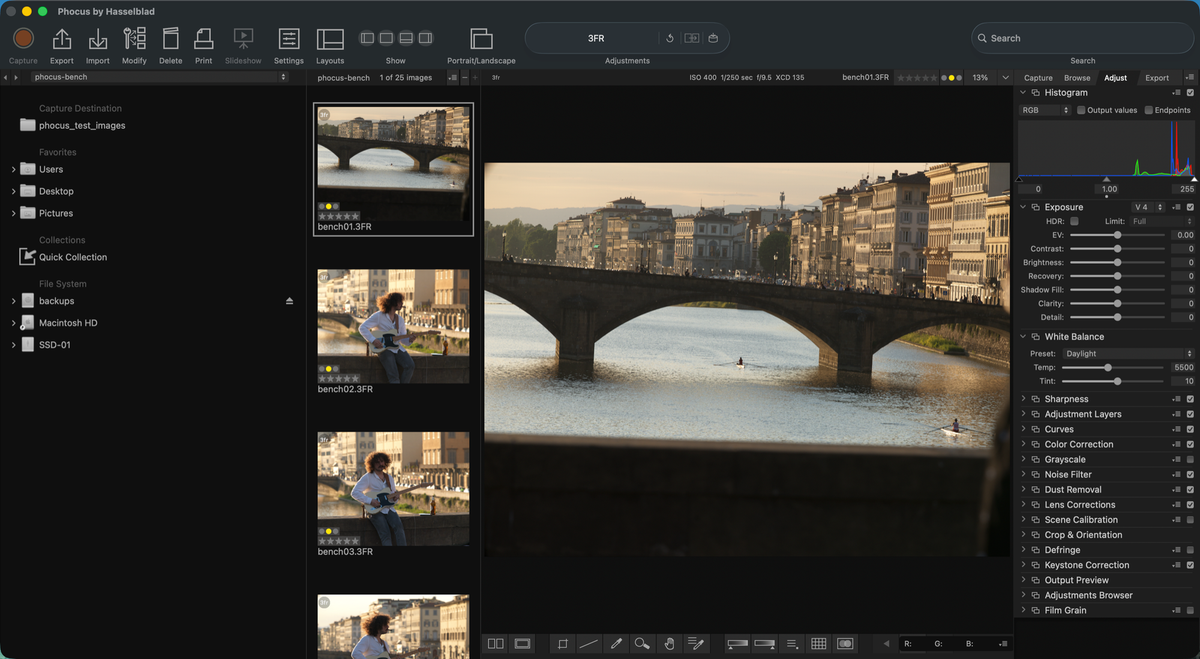
If you just bought a Hasselblad X System camera, or you're deciding whether to, "Phocus" is the word you might keep running into and nobody quite defines. It's Hasselblad's own photo editing software, it's free, and depending on who you ask it's either essential or optional. Both are true, depending on what you're shooting for.
Phocus is the Hasselblad app that turns a 3FR or FFF file from your camera into a finished image. It's a download for Mac and Windows, and it's the only application that can, inter alia, apply Hasselblad's proprietary color rendering to your files. Everything below covers what it actually does, what it costs, and when you can safely skip it.
Key finding: Phocus is Hasselblad's own RAW processing software for its digital cameras across the X, V, and H Systems. It's free, requires no account or registration, and applies Hasselblad's proprietary HNCS color science at render time, something no other RAW processor can replicate. The current Mac release is Phocus 4.2.1.
What Phocus Does
Phocus imports your camera's RAW files (3FR straight off the card, or FFF if you shoot tethered or convert on import), decodes them, and renders them using Hasselblad's own color pipeline. From there it's a working editor, not just a converter: highlight recovery, shadow fill, white balance, cropping, a histogram tool, local adjustment layers with radial, linear, and brush masks, keystone correction, and noise reduction (HNNR, Hasselblad Natural Noise Reduction) all live inside the app.
Export covers TIFF, JPEG, and DNG, plus Ultra HDR JPEG and HDR HEIF for HDR captures. Tethered shooting is built in too, with live view, focus tools, and a capture sequencer. That's the full stack in one free app.
Camera support runs across the current X System (X2D II, X2D 100C) and X1D II, V System backs like the CFV II and CFV 100C, and the H System line.
Is Phocus Free to Use?
Yes. Phocus is a direct download from hasselblad.com, and Hasselblad's own product page describes it as "our powerful, free RAW file image processing software."¹ There's no license fee, no subscription, and no Hasselblad account required to install or run it. You download the installer, launch the app, and start importing. No login prompt, no registration screen.
What isn't free is documentation. Hasselblad's own manual for Phocus still tops out at version 3.8, several major releases behind the 4.x line most current X System owners are running. A copy of the official user guide still hosted on Hasselblad's CDN is dated December 2018.² If you've gone looking for an up-to-date manual and come up empty, that's why. I wrote the guide that covers the version you're actually using, which is where the paid side of this comes in: my Phocus 4.x manual is $49 and covers everything from import behavior to the HDR export pipeline, built from direct testing rather than from documentation that stopped at version 3.8.
There's also Phocus Mobile 2, a separate free app for iPhone, iPad, and, since July 2026, Android. It only imports directly from a connected camera rather than from files already on your device, and it covers a narrower slice of the toolset than the Mac app. It's a companion to Phocus on Mac, not a replacement for it.
Have you seen the guide? I've published Essential Phocus 4.x for Mac - 85 topics across 8 sections and 251 pages covering everything from HNCS color science to HDR workflows. It's the reference manual Hasselblad hasn't updated since 3.8. It's $49, and updates are included.
HNCS Color Science Only Renders Correctly in Phocus
The reason Phocus matters more than "free software that opens your files" is Hasselblad Natural Colour Solution, or HNCS. It's Hasselblad's proprietary color rendering system, and it's built into the Phocus RAW engine specifically. HNCS isn't a static profile. You can't copy it into another app. It selects an illuminant-matched color matrix and chroma correction LUT based on your white balance setting, and applies the Hasselblad Film Curve as part of the render itself, not as a filter layered on top of a neutral image. Hasselblad's own written definition, obtained from their engineering team in August 2026, is in I Asked Hasselblad Which Render Is the Real HNCS. Wrong Question, as it turns out..
That means white balance, highlight recovery, and shadow fill adjustments inside Phocus all feed back into how HNCS renders your file. Change one of those settings and you're not just adjusting tone, you're changing which color matrix gets applied. No other RAW processor has access to this pipeline, and HNCS can't be exported as a preset or profile to use elsewhere. I've written up the full mechanics, including what gets saved where and when Phocus decides to reprocess, in a deeper piece on how Phocus actually behaves if you want the details, and the full glossary if a term here is unfamiliar.
Phocus Compared to Lightroom and Capture One
Both Lightroom Classic and Capture One can open Hasselblad RAW files today. Neither can render them the way Phocus does.
| Phocus | Lightroom Classic | Capture One | |
|---|---|---|---|
| Opens Hasselblad RAW natively | Yes (3FR and FFF) | Yes (3FR, own sensor profile) | Yes, 3FR for X2D II, X2D 100C, CFV 100C (16.8.3+) |
| Applies HNCS color science | Yes | No | No |
| Cost | Free | Subscription | Subscription or perpetual license |
| Local adjustment masking | Basic (radial, linear, brush) | Advanced (AI masking) | Advanced (layers, AI masking) |
| Best for | Hasselblad color rendering | Full editing workflow | Full editing workflow |
Lightroom opens 3FR files directly using its own Hasselblad sensor profile. Capture One added native 3FR support for 100C-generation bodies in version 16.8.3, released under a formal partnership with Hasselblad. Both are legitimate if RAW compatibility is all you need. That's it, though. Neither has access to HNCS, so the color you get out of them is Capture One's or Adobe's interpretation of your sensor data, not Hasselblad's. I go through exactly what changes and what doesn't in a side-by-side comparison of what you keep and lose skipping Phocus, and a separate post on what Capture One's Hasselblad support actually covers.
The workflow most people land on isn't exclusive. Cull the shoot first so you only render the keepers, then apply HNCS in Phocus (and HNNR if you need noise reduction), export a 16-bit TIFF, and bring that TIFF into Lightroom or Capture One for masking and further editing. You get Hasselblad color plus whichever editor's tools you already know.
Researching and writing the blog and page posts I produce takes up a lot of my time and costs me money for software subscriptions, tooling, and other incidentals related to running a business.
Please consider a paid membership to help me keep the lights on and pay the bills - it is only a fraction of the cost of an X2D II and a lens. Click on the button to go to the membership page to see the options available.
What You Need to Run Phocus
Hasselblad lists 8 GB of RAM as the minimum and 16 GB as recommended. Those figures get you through installation and launch. They don't reflect what Phocus actually uses once you're browsing and editing 100-megapixel files from an X2D-series camera.
| RAM | Real-world experience |
|---|---|
| 8 GB | Not viable for editing. Constant swapping from the first image click. |
| 16 GB | Workable if you close every other app; HNNR and HNCS spikes push into swap. |
| 24 GB | Comfortable. Room for Phocus plus light multitasking. |
| 32 GB+ | Headroom to run Phocus alongside a full editing stack. |
Phocus 4.2 lowered steady-state memory usage compared to the 4.1.x line after fixing an export memory leak, but 24 GB remains the realistic minimum if you want Phocus to keep up with you rather than feel managed. Apple Silicon is assumed at this point; if you're still on an Intel Mac, budget for it running slower across the board, and skip HNNR entirely: it runs on the Apple Neural Engine, which Intel Macs don't have.
Current Version and Update Cadence
The current release for Mac is Phocus 4.2.1. It shipped in July 2026. Before that, Hasselblad pushed 4.2, 4.1.2, 4.1.1, and 4.1 over the roughly six months prior, so expect a new point release every several weeks to a couple of months rather than a fixed schedule. Updates typically fix specific bugs or add narrow features (a new export option, a performance fix) rather than overhauling the app. Don't count on the release notes to tell the whole story either: some changes, including important ones, never appear in any changelog.
Because this post doesn't get updated every time Hasselblad ships a point release, check my Phocus version history and changelog for whatever's current when you're reading this. It's worth updating when a release note mentions something you've hit personally; it's not worth treating every point release as urgent.
Do You Actually Need Phocus?
If you shoot Hasselblad and care about Hasselblad's own color rendering, yes. There's no substitute. Phocus is the only way to get it. If you're shooting for a client workflow built entirely around Lightroom or Capture One and you're fine with their color interpretation of your RAW files instead of Hasselblad's, you can skip Phocus and import directly.
Most people land on a hybrid: Phocus for the initial render and HNCS, then a second app for the editing tools they already know. That path costs nothing extra since Phocus itself is free, and it's the setup I use myself. If you're past the "what is it" stage and want the version-specific detail Hasselblad's own documentation never got around to writing, that's what the Phocus 4.x guide is for.
References
- Hasselblad, "Phocus for PC/Mac": Official product page describing Phocus as free RAW processing software and listing current feature set. hasselblad.com
- Hasselblad, "User Guide v21," Phocus documentation PDF hosted on Hasselblad's CDN, dated December 2018. cdn.hasselblad.com