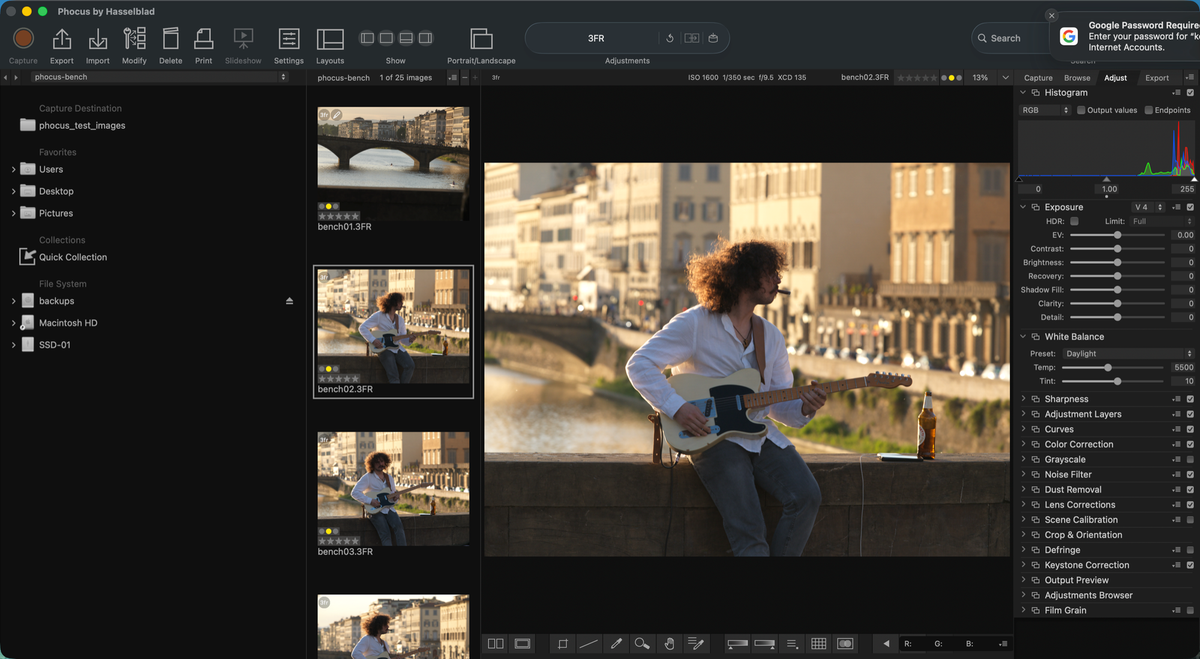
Search "HNCS" and Google hands you Hasselblad's own one-paragraph definition, an AI Overview that restates it, and not much else. The official line is that HNCS produces "highly accurate, true-to-life tones directly out of camera." That's marketing copy, not a mechanism. It doesn't say when the color gets decided, why the same 3FR file looks different in three different applications, or why picking "Nature" instead of "Standard" changes more than you'd expect.
I've spent months testing Phocus behavior across versions for the Phocus guide project, including exporting the same RAW file through every factory preset and diffing the resulting .phos sidecars byte for byte. This post is the mechanism explainer: what HNCS actually does, where it runs, and where it stops. That last part matters, because Hasselblad's separate HDR pipeline builds on top of HNCS and gets its own explainer, linked below, rather than getting mixed in here.
Key finding: HNCS (Hasselblad Natural Colour Solution) isn't baked into your 3FR at capture. It's a render-time pipeline in Phocus: an illuminant-specific color matrix and chroma LUT, chosen by your white balance setting, then the Hasselblad Film Curve. No other RAW processor has access to it, and changing white balance reruns the whole thing.
What Hasselblad Natural Colour Solution (HNCS) Actually Is
Hasselblad Natural Colour Solution, HNCS for short, is a color management pipeline built into the Phocus RAW engine.¹ Hasselblad's own description: it "remaps the captured values" from the sensor and "adapts to any illumination," using proprietary lookup tables and the Hasselblad Film Curve to go from 16-bit sensor data to a rendered image.¹ Note the vocabulary. Hasselblad's official materials call this a "Natural Colour Solution," not "color science." One long-running DPReview forum thread makes the same observation while trying to pin down the term.² Searchers reach for "Hasselblad color science" because that's the plain-English description of what's happening, but it's not the brand's own phrase, and that mismatch is part of why the search results for it are thin.
The part that actually matters for your files: HNCS is a software decision, applied to the render each time Phocus opens the file, never written into the RAW itself, and not a setting baked in by the camera at the moment of capture. (Everything measured for this post was tested on Phocus 4.x.) The 3FR on your card is identical regardless of which HNCS preset you apply later. Everything described below happens after the shutter closes.
The Render Pipeline: Matrices, LUTs, and the Film Curve
When Phocus opens a 3FR, it runs a four-step pipeline every time, shown below. Steps 2 through 4 rerun in full whenever the white balance value changes, which is the part most RAW processors don't do.
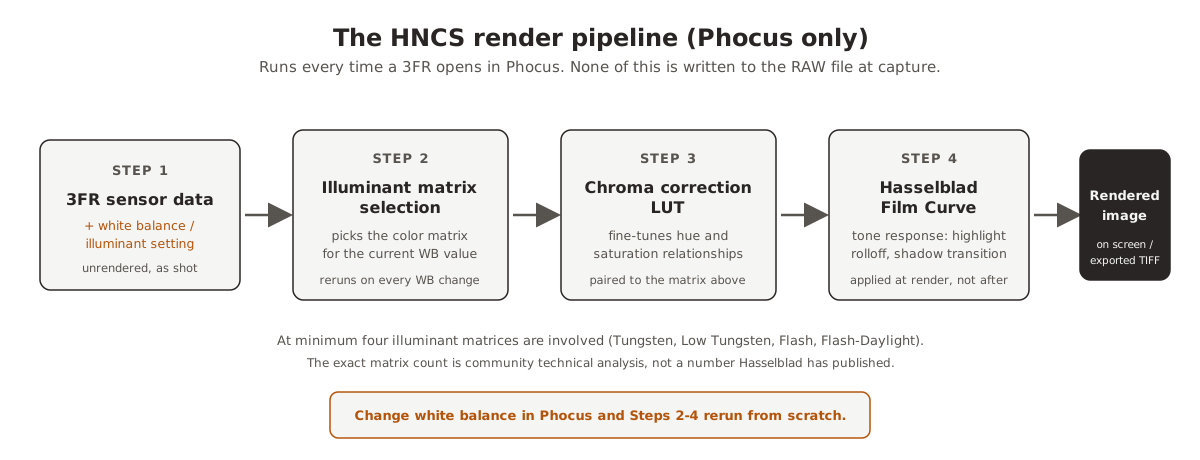
Figure 1: The HNCS render pipeline runs inside Phocus on every open, and reruns from Step 2 onward whenever white balance changes.
Phocus implements a multi-illuminant model. At minimum four illuminant matrices are involved: Tungsten, Low Tungsten, Flash, and Flash-Daylight.³ I want to be precise about the sourcing here: that specific count (a floor, not the full set) comes from community technical analysis on the Luminous Landscape forums, not from anything Hasselblad has published.³ Hasselblad's own material confirms the mechanism (illuminant-adaptive transforms) without giving a number.¹ Each matrix pairs with a chroma correction LUT, a lookup table that fine-tunes hue and saturation relationships for that specific light source. Phocus selects the matching pair automatically based on your white balance setting, then applies the Hasselblad Film Curve, a tone curve that governs highlight rolloff (how tones compress as they approach pure white) and shadow transition, at render time rather than as a post-processing layer on top of a neutral image.
That render-time placement is why HNCS survives version updates cleanly and why it can't be extracted as a standalone profile. It's not a static filter you could export and apply elsewhere: it's a decision tree that reruns fresh every time Phocus interprets sensor data, conditioned on a setting (white balance) that changes from file to file.
The working space that pipeline renders into is Hasselblad RGB, and its primaries are now measured rather than described: Hasselblad RGB Is Wider Than Adobe RGB.
One measured caveat about that render-time pipeline: the desktop import flow does not apply any HNCS preset by default, so the first render you see (and anything you export before applying a preset) is not the HNCS interpretation: Phocus for Mac Imports Aren't HNCS by Default.
Why Does White Balance Change More Than Color Temperature?
In Lightroom or Capture One, white balance is a straightforward adjustment: shift the temperature and tint sliders, and the software applies a multiplier to image data that's already been decoded. Phocus works differently. Change the white balance value and Phocus selects a different illuminant matrix and its paired chroma correction LUT, then reruns the entire HNCS transform from the sensor data up, not just the color balance.⁴
The consequence is easy to miss. A white balance value set in Phocus and exported to a TIFF will produce different color relationships than the numerically identical temperature and tint applied afterward in Capture One or Lightroom, because the matrix-selection step only exists inside Phocus. Auto white balance shooters are the most exposed to this: every file can carry a different in-camera WB tag, and Phocus reads that tag before choosing which transform to run. Shooting a fixed white balance, daylight around 5000K for example, keeps the illuminant selection stable across an entire shoot and reduces (though doesn't eliminate) the gap, since WB adjustments made inside Phocus still operate one level deeper than the same adjustment made downstream.
The takeaway for a mixed workflow: if any part of your pipeline touches Phocus, set final white balance there before exporting, not after.
Have you seen the guide? I've published Essential Phocus 4.x for Mac - 85 topics across 8 sections and 251 pages covering everything from HNCS color science to HDR workflows. It's the reference manual Hasselblad hasn't updated since 3.8. It's $49, and updates are included.
HNCS Presets Aren't a Different Color Science
This is the part that surprised me when I measured it. The Import dialog's "Adjustment" dropdown, and the presets available afterward, are labeled Standard, Nature, Portrait, Product, and Square Crop. It's easy to assume each one invokes a different color rendering. It doesn't. I exported the same RAW file through every preset and compared the resulting .phos sidecars directly.⁵
| Preset | Sharpening (USM Amount) | Tone curve | Brightness / Contrast / Saturation |
|---|---|---|---|
| Standard | 100 | Linear | 0 / 0 / 0 |
| Nature | 180 | S-curve (shadows crushed, highlights lifted) | 0 / 0 / 0 |
| Portrait | 90 | Linear | 0 / 0 / 0 |
| Product | 350 | Linear | 0 / 0 / 0 |
| Square Crop | 100 | Linear, plus a fixed crop | 0 / 0 / 0 |
Figure 2: Measured directly from Phocus's own .phos sidecar output across all five factory presets. Full parameter breakdown in What Phocus Writes to the .phos When You Switch HNCS Presets.
Brightness, Contrast, Saturation: unchanged across every one of them. The visible differences come entirely from sharpening parameters and the tone curve, not from a swapped color matrix. Selecting "Nature" doesn't hand you a different HNCS pipeline, it layers a specific tone curve and a heavier sharpening profile on top of the same underlying render. That's worth knowing before you assume a preset name tells you anything about the color transform itself.
One workflow note that trips people up: change the preset after you've already made adjustments (exposure, white balance, crop) and Phocus wipes them. It treats a preset switch as a full rendering reset, not an additive change. Decide on your preset first. Everything else waits.
Researching and writing the blog and page posts I produce takes up a lot of my time and costs me money for software subscriptions, tooling, and other incidentals related to running a business.
Please consider a paid membership to help me keep the lights on and pay the bills - it is only a fraction of the cost of an X2D II and a lens. Click on the button to go to the membership page to see the options available.
Why Do Lightroom and Capture One Render It Differently?
Lightroom applies its own camera profile to the sensor data, one Adobe built specifically for Hasselblad cameras. Since Capture One 16.8.3 (July 2026), Capture One can open 100C-generation .3FR files natively too, under a formal partnership with Hasselblad, rendering them with Capture One's own color science.⁶ Neither tool has access to the illuminant-matrix-selection step described above, and neither has access to the Hasselblad Film Curve, which isn't published as an exportable ICC profile or LUT. They're both applying a competent, independently-developed interpretation of the same raw sensor data, not a worse copy of Hasselblad's rendering. Different, not worse.
Whether that difference matters enough to justify a Phocus-first workflow depends on what you're doing with the files. I've written the full trade-off, including side-by-side testing, separately: what you keep and what you actually lose skipping Phocus. The short version: you keep full RAW data and a competent baseline render either way. What you lose by skipping Phocus is specifically the HNCS pipeline and HNNR noise reduction, neither of which travels.
HNCS and HDR Are Two Different Questions
It's worth being explicit about scope, because the two get conflated constantly in search results. Everything above is the standard HNCS pipeline that runs on every 3FR you open, HDR or not. Hasselblad's HDR pipeline is a separate, additional layer built on top of it: a single RAW exposure, captured with a highlight-protection bias from Smart Metering, that Phocus can encode into HDR output formats (Ultra HDR JPEG, HDR HEIF, HDR TIFF) carrying extended luminance via a gain map or PQ encoding.
Related: Hasselblad's own written definition of HNCS, quoted in full.
One exposure. Not a bracketed capture, not a blend. If you're picturing the multi-frame HDR from Sony, Canon, or Fuji, that's a different mechanism entirely, and one Hasselblad's HDR pipeline is explicitly not doing. I've covered that pipeline in full separately: what HNCS HDR is and why RAW shooters should care.
What This Means for Your Workflow
A few practical conclusions follow directly from the mechanism:
- Pick your HNCS preset first, before any adjustment. Switching it later resets exposure, white balance, and crop, by design, not as a bug.
- Set white balance inside Phocus if any part of your pipeline runs through it. The matrix-selection step that makes Phocus's WB different from Lightroom's or Capture One's only exists there.
- A TIFF export carries the rendered pixels, not the preset name. Only the
.phossidecar records which preset produced a given render. Archive the RAW and sidecar together if you need to know later. - Native
.3FRsupport in Capture One and Lightroom Classic is a genuine alternative, not a shortcut to HNCS. Either route skips Phocus entirely and renders with its own color, which is a legitimate choice, just not the same one.
Related: where white balance sits in my complete cull-to-Lightroom workflow.
The color you see in Phocus is one specific, non-reproducible interpretation of the sensor data, chosen the moment Phocus reads your white balance setting. Every export downstream inherits that choice, whether you notice it or not.
References
- Hasselblad, "Hasselblad Natural Colour Solution": official description of HNCS as transformations that "remap the captured values" and adapt to illumination, using LUTs and the Hasselblad Film Curve. hasselblad.com
- DPReview Forums, "About that 'Hasselblad Color Science'...": community discussion noting Hasselblad's own materials describe HNCS but don't use the phrase "color science." dpreview.com
- Luminous Landscape Forums, "Hasselblad Natural Color Solution (HNCS) - how it works (probably)": community technical analysis identifying four illuminant matrices with automatic selection based on white balance. forum.luminous-landscape.com
- Author's testing across Phocus 4.0.1 through 4.2, comparing white balance adjustments made in Phocus versus the same numeric values applied downstream in Capture One.
- Author's testing, Phocus 4.1.2: the same X2D II RAW exported once per factory preset, sidecars compared directly with
plutil -p. Full breakdown in What Phocus Writes to the .phos When You Switch HNCS Presets. - Capture One support documentation on Hasselblad camera and lens support, updated following the July 2026 partnership announcement. Full analysis in Capture One's Hasselblad Support: What You Get and What Stays in Phocus.