
A reader question about the X2D II's stabilization sent me back through Hasselblad's documentation this week. What I discovered down that rabbit hole changed how I now use my own X2D II. The short version: the X2D II's Earth rotation compensation depends on location data that only reaches the camera when you connect Phocus Mobile 2 (iOS and iPadOS - cannot confirm Android), that data goes stale after 4 hours, and the background sync some of us might have assumed (hoped?) was happening is not.
If you shoot handheld long exposures on an X2D II and have never thought about when you last opened Phocus Mobile 2, this post is for you. I had the sync model wrong myself until this week.
Key finding: The X2D II's Earth rotation compensation relies on location data synced from Phocus Mobile 2, with a 4-hour lifespan per Hasselblad's FAQ. The app has no "Always" location permission on iOS, so fresh location cannot reach the camera in the background. Connect the app shortly before shooting; a paired-but-closed phone is not feeding it. Hasselblad engineering has since confirmed: every connection refreshes the fix and restarts the 4 hours.
What Hasselblad Actually Documents
The official record on Earth rotation compensation is remarkably short: a few sentences across two documents, plus one caution. The X2D II manual, section 2.8, says the stabilization system "supports Earth rotation compensation to enhance stabilisation performance," and recommends connecting the camera "to the Phocus Mobile 2 app every 4 hours or when there is a significant change in geographical location to synchronise location information automatically."¹
Hasselblad's X2D II FAQ is more specific, and its wording warrants a close reading:
"Each time X2D II 100C connects to Phocus Mobile, it obtains current latitude/longitude position. Using location and compass information compensates for Earth's rotation effects on stabilisation. We recommend connecting to Phocus Mobile before shooting to help the stabilisation system obtain latest geographic information, valid for 4 hours."²
That wording holds up under questioning. When I first drafted this post, "each time... it obtains" was Hasselblad's claim rather than verified behavior, and the open case was a reconnect during a still-valid window: does it update the position, and does it reset the 4-hour clock? I put exactly that scenario to Hasselblad support, who ran it past their software engineering team. The answer, August 2026: yes to both. Every connection actively acquires the current latitude and longitude and overwrites the stored fix, and the 4 hours always count from the most recent acquisition. Connect at 09:00, reconnect at 11:00, and the camera now holds the 11:00 fix, valid until 15:00.
The manual's one caution: "In high latitude areas or regions with strong magnetic fields, the Earth rotation compensation feature may fail."¹ No further explanation is given.
There is no GPS accessory for the X2D II, it has no built-in GPS, and neither the manual nor the FAQ assigns any location role to desktop Phocus, so Phocus Mobile 2 is the only documented path location data has into the camera. Hasselblad support confirmed this to me directly, after checking with their engineering team, that the feature obviously requires in-body stabilization to be enabled. It is part of the stabilization system, so it follows the same rules, including switching stabilization off on a tripod.
Everything else in circulation, including the sync model I believed until this week, is interpretation.
Researching and writing the blog and page posts I produce takes up a lot of my time and costs me money for software subscriptions, tooling, and other incidentals related to running a business.
Please consider a paid membership to help me keep the lights on and pay the bills - it is only a fraction of the cost of an X2D II and a lens. Click on the button to go to the membership page to see the options available.
Why Does a Camera Need to Know Where It Is?
The Earth rotates roughly 15 degrees per hour, and a gyroscope-based stabilization system senses that rotation the same way it senses hand shake. The camera cannot tell the difference between the sensor drifting and the planet turning underneath it. An analysis at The Center Column calculated that uncompensated Earth rotation puts a theoretical ceiling of around 6.3 stops on gyro-based IBIS at long shutter speeds.³ That figure is the author's own calculation for a specific scenario, not a measured spec from any manufacturer, but it shows the scale of the effect: large enough to be worth engineering around.
Simulated long exposure · one scene, three stabilization states
The counterintuitive part: with stabilization off, the Earth's rotation in and of itself will not blur a landscape at all. Your camera, your tripod, your subject, and the ground under them all rotate together, as one rigid scene, so nothing moves relative to anything else. The problem appears the moment stabilization turns on.
A gyro measures rotation against the fixed stars, not the ground, so it reports the planet's 15 degrees per hour as camera movement. The stabilizer dutifully cancels it, and now the sensor is held still against the stars while the scene drifts away with the planet. So stabilization on a tripod creates the very blur it then needs location data to avoid with hand-held shots.
When shooting hand-held, feed the camera its position and heading, and it can subtract the planet's share from the gyro signal and correct only your shake. That is the whole feature: removing a known error source from the stabilization math.
How much of that rotation appears on which axis depends on where you are standing, which is essentially your latitude, and which way the lens points, which is where the compass comes in. The full physics, with two more interactives covering the drift math and the latitude-and-heading geometry, lives on my Earth rotation and IBIS science page. My deeper look at the X2D II's autofocus system came from the same instinct that drives this post, that the interesting engineering is usually in what the spec sheet does not say.
The 4 Hours Is a Validity Window, Not a Refresh Schedule
A common reading of Hasselblad's guidance, on Reddit and elsewhere, seems to be that once the camera is paired, it quietly refreshes its location from your phone every 4 hours.⁴ I shared that assumption. I connected my camera to the app every day or two because, well, sometimes apps get weirdly wedged, and considered the feature fed.
On closer reading, Hasselblad's text does not say what I and many others thought it did. Both the manual and the FAQ only ever describe connecting the camera to the app, and the FAQ's phrasing is precise: the geographic information the camera obtains at connection is "valid for 4 hours." Read plainly, that implies a staleness window on the last sync, not a background schedule. You connect, the camera gets a fix, and that fix is good for 4 hours. My every-other-day habit was buying me a valid fix for 4 hours out of every ~48.
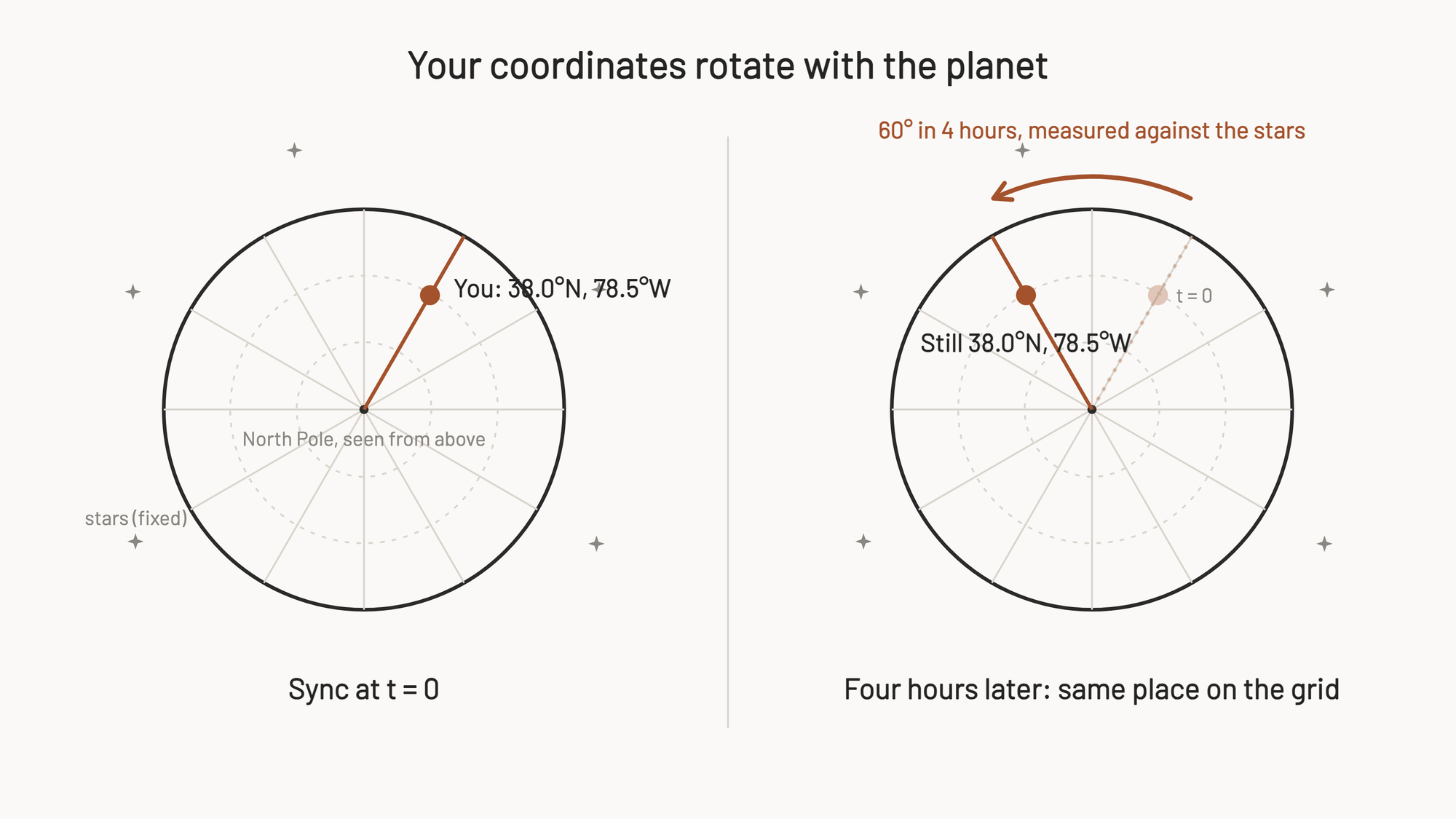
A reader follow-up sharpened why a fix expires at all. Earth turns 60 degrees of longitude every 4 hours. So does the synced position drift thousands of kilometers stale over an afternoon? Latitude and longitude are coordinates on the rotating planet, and the rotation carries you, the camera, and the entire grid around together, so a synced fix stays geographically exact no matter how long the planet turns. The only thing that can change that calculus is you traveling, and the camera has no GPS of its own to notice that you have done so. Read that way, the 4 hours is policy rather than physics: a Hasselblad guess at how long an owner might go before ending up somewhere meaningfully different. That last sentence is my inference; Hasselblad has never explained the number.
Have you seen the guide? I've published Essential Phocus 4.x for Mac - 85 topics across 8 sections and 250 pages covering everything from HNCS color science to HDR workflows. It's the reference manual Hasselblad hasn't updated since 3.8. It's $49, and updates are included.
Android, iPad, and the original X2D 100C
Three scope notes, because the permission argument above is iPhone-specific.
- On iPad, Phocus Mobile 2 is the same app under iPadOS, and the permission tiers work the same way (I verified the permission pane on an iPhone). The bigger iPad issue is hardware: Apple's spec sheets list GPS/GNSS under "Wi-Fi + Cellular models" only.⁷ A Wi-Fi-only iPad has no GPS receiver at all; it can estimate location from nearby Wi-Fi networks, but standing in a field with no Wi-Fi around, it has no real fix to hand the camera. If an iPad is your only Phocus Mobile 2 device and it is a Wi-Fi-only model, assume the camera is not getting useful location data.
- On Android, the story changed recently: Hasselblad shipped Phocus Mobile for Android (V1.0.0) for the X2D II, X2D 100C, and 907X & CFV 100C, but its announcement covers importing, editing, and exporting only, with no mention of location sync or Earth rotation compensation.⁶ Whether the Android app feeds the camera location at all is undocumented, and Android's permission model differs from iOS's, so nothing in the previous section transfers.
- The feature itself appears only in X2D II documentation. I find no mention of Earth rotation compensation in original X2D 100C materials, whose stabilization carries the older 7-stop rating, so treat this whole post as X2D II-specific.
What About the Extra Stops?
A version of this feature's value I've seen circulating implies "8 stops of IBIS without the app, 10 with it." That specific split is, however, not what Hasselblad publishes. The FAQ's footnote on the stabilization rating reads:
"10-stop stabilisation at the image centre and 8-stop at the edges. Measured by Hasselblad with the XCD 3,5/120 Macro lens using CIPA standards."²
That is a center-versus-edge split in the CIPA measurement, not a with-app-versus-without-app split. Hasselblad has never published how many stops Earth rotation compensation adds, or what the rating would be with no phone ever paired.
The community version is not baseless speculation. Removing a known error source should improve the measured ceiling, and the Reddit threads connecting the two are reasoning in the right direction.⁴ ⁵ But it is inference, and the specific numbers attached to it are unconfirmed. If you have seen the 8-to-10 claim stated as fact, this is where it actually stands. For what the CIPA-rated hardware itself is doing, my X2D II vs X2D 100C comparison covers the stabilization changes between generations.
What This Means in the Field
My practice has changed, and this is what I now do:
- Connect Phocus Mobile 2 shortly before any session where stabilization matters, and connect from a device that actually has GPS. That is also what Hasselblad's FAQ recommends. Opening the app and connecting is the only action that verifiably gets fresh location into the camera, and it needs to come from an iPhone or a cellular iPad; Wi-Fi-only iPads have no GPS hardware (details in the scope notes above).
- Reconnect if a session runs past 4 hours. The camera shows no indicator of whether its location data is current, and neither does the app. One owner who raised this with Hasselblad support reported the same: no feedback on whether the transfer succeeded, and, according to their account of support's reply, the phone needs no internet connection for the sync.⁴ You also do not need to time it: per Hasselblad engineering's answer above, any reconnect, even well inside the window, replaces the fix and restarts the clock.
- Don't worry about small geographic movements. A reader asked whether staying within a 2 km radius keeps the location valid. No radius is published anywhere, but the mechanism answers this one: what the compensation needs is dominated by latitude, and a 2 km move changes your latitude by roughly 0.02 degrees. Moving across town is nothing. "Significant change in geographical location" plausibly means a different city or a long drive north or south, though that reading is mine, not Hasselblad's.
- Do not count on the phone doing anything after you put it away. Sleep it, quit the app, leave it in the car: the fix the camera already holds is what it has.
What Remains Unknown
The categories need careful separation, because this is where most retellings go wrong. Documented: everything in the first section, which since August 2026 includes engineering's answer on reconnects, so the validity-window reading has graduated from inference to confirmed. Still inference: the iOS permission consequence, the latitude reasoning. Unknown, with nothing published either way:
- What the camera does when the 4 hours lapse. My assumption is that it stops applying the compensation until it gets fresh data rather than continuing on a stale fix. That would be the sensible design, and the FAQ's validity phrasing gestures at it, but no source states it.
- What "valid" survives. Whether a battery swap or a power cycle clears the stored fix is not documented.
- Which stabilization modes run the compensation. The manual describes it as a property of the stabilization feature generally, not tied to a specific mode. Unverified on camera.
References
- Hasselblad X2D II 100C User Manual v1.0, section 2.8, Image Stabilisation
- Hasselblad X2D II 100C FAQ
- The Center Column: Earth's Rotation Limits IBIS Performance to 6.3 Stops
- r/hasselblad: "Didn't realize this about Phocus Mobile 2 and IBIS"
- r/hasselblad: X2D II 35-100 stabilization discussion
- Hasselblad press release: Hasselblad Brings Phocus Mobile to Android
- Apple iPad Pro technical specifications, Location section