Open the same X2D II 3FR in Phocus 4.2.3 and in Lightroom Classic 15.6 and compare the brightest tones that are not clipped. In my white-card measurements Lightroom renders them 2 to 3 L* darker, and the gap starts at a specific point in the tonal range. I measured a white card, not skies, snow or white walls. Those tones sit in the same range, but I have not measured them.
L* is the lightness scale color software uses, 0 for black and 100 for white. Raw level is how far a pixel sits between black (0) and saturation (1) in the raw file, measured on the green channel in linear terms, so raw level 0.5 is one stop below clipping. For scale, a color difference (dE2000) of about 1 is at the threshold of what you can see side by side, and 2 to 3 is visible on a calibrated display. Adobe's own profile measured a median of 2.4 from Phocus in my July comparison.¹
Lightroom here means Classic with Phocus Look 1e, the custom profile I built to make Lightroom render X2D II files like Phocus. It is a work in progress and I am not handing it out yet.
A note on support: This post represents my personal exploration and testing, not official technical support or guidance from Hasselblad. If you need assistance with your Hasselblad equipment, please contact Hasselblad directly: customersupport@hasselblad.com for global support, support.us@hasselblad.com for the Americas, or visit hasselblad.com/support for regional options.
Key finding: On X2D II white-card frames (XCD 90V, f/8), Lightroom Classic 15.6 with my custom profile renders tones 2 to 3 L* darker than Phocus 4.2.3 from raw level 0.6 up, and about 0.4 L* darker below that. Lightroom compresses tones before the profile's tone curve. The Whites slider is the wrong fix.
Where the two renders split
Below raw level 0.6 Lightroom sits a steady 0.4 L* under Phocus (0.6 in the darkest bin). Above it the gap grows to about 3 L* and stays there until the card clips.
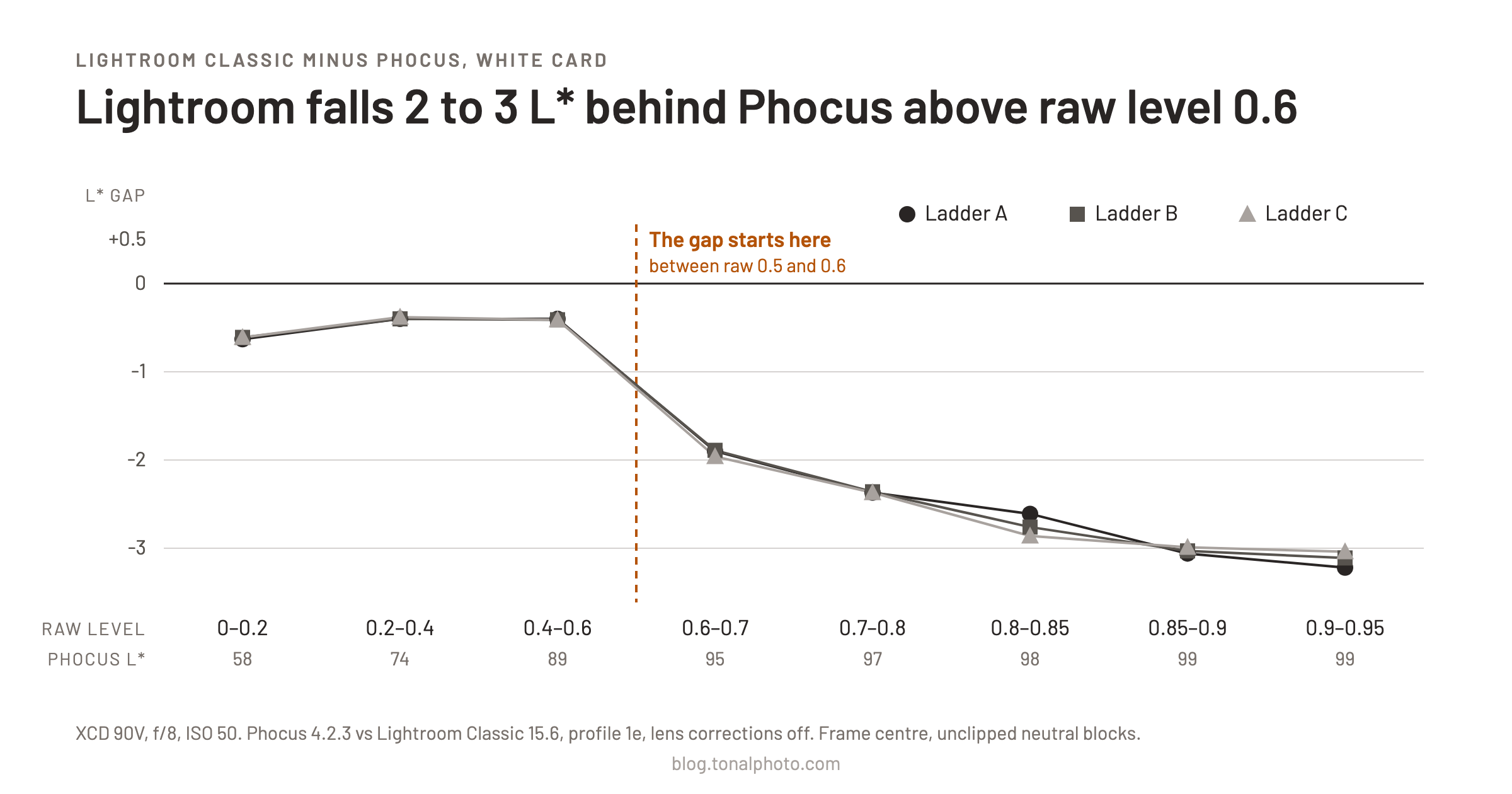
Figure 1. Lightroom minus Phocus lightness (L*) on a white card, by raw level. Three ladders, XCD 90V at f/8, ISO 50, Daylight white balance. Phocus 4.2.3 against Lightroom Classic 15.6 with profile 1e, lens corrections off, Lightroom sliders at zero. Frame center, unclipped neutral blocks, measured 31 October 2026.
| Raw level | Phocus L* | Ladder A | Ladder B | Ladder C |
|---|---|---|---|---|
| 0 to 0.2 | 58 | -0.63 | -0.61 | -0.61 |
| 0.2 to 0.4 | 74 | -0.40 | -0.40 | -0.38 |
| 0.4 to 0.6 | 89 | -0.40 | -0.41 | -0.41 |
| 0.6 to 0.7 | 95 | -1.90 | -1.89 | -1.96 |
| 0.7 to 0.8 | 97 | -2.37 | -2.36 | -2.37 |
| 0.8 to 0.85 | 98 | -2.61 | -2.76 | -2.86 |
| 0.85 to 0.9 | 99 | -3.06 | -3.03 | -2.99 |
| 0.9 to 0.95 | 99 | -3.22 | -3.11 | -3.04 |
The three ladders agree within 0.25 L* in every bin. That shows the measurement repeats, not that it holds for other lenses, cards or light, because all three used the same ones.
The gap starts between the 0.4 to 0.6 bin (Phocus L* 89) and the 0.6 to 0.7 bin (L* 95). Patch checks on single frames put the onset between raw 0.5 and 0.6, roughly L* 89 to 93. My bins cannot place it more finely. I attribute the steady 0.4 L* below the onset to a per-lens brightening Phocus applies to 90V frames and Lightroom does not, from a separate lens-swap test.
In the white-card set shot at f/2.5, Phocus reached L* 100 at raw level 0.94 with nothing clipped. Lightroom reached 100 only once the red channel was near clipping, about 1.5 stops after green clipped.
How I measured it
I shot the card with the XCD 90V at ISO 50 and Daylight white balance, stepping the shutter in thirds of a stop up to clipping. Phocus rendered with the Standard response and as-shot white balance. I wrote the questions down before opening any Lightroom export. An earlier set at f/2.5 showed the same shape: about -0.4 L* below raw 0.6 and -2.8 to -3.3 above 0.8. I repeated it at f/8 to take wide-open vignetting and color shading out of the picture.
The limits sit at the top of the range. Above raw 0.8 each ladder has only two frames, and 0.9 to 0.95 has one. There are no unclipped neutral pixels at 0.95 to 0.99, so I cannot say anything about the last few percent before clipping.
It is not the profile's tone curve
The profile's tone curve ends at 1, 1, and its color table leaves neutral tones alone. A model I built of how the DNG specification says a profile is applied reaches L* 99.9 at raw 1.0 with this profile. Lightroom does not.
That left the profile's exposure offset. 1e carries a +0.23 EV BaselineExposureOffset, Lightroom applies about -0.2 EV of its own, and the net is +0.03 EV. I suspected an interaction with Lightroom's highlight handling and exported a set at Exposure -0.23 to cancel it. The gap grew. A review of that result pointed out that the slider and the profile tag might not behave the same way, so I built a copy of the profile with the offset at zero and exported two frames at Exposure 0. They were pixel-identical to the -0.23 exports across 101.9 million pixels. In Lightroom 15.6 the tag and the slider do the same thing, and the offset is not the cause.
Why does Lightroom render bright tones darker than Phocus?
Because Lightroom compresses tones before they reach the profile's tone curve. My first test of this failed its own pre-registered rule. I raised the profile's curve above input 0.8 and expected neutral tones at raw 0.80 to 0.92 to brighten. They did not move at all, though Lightroom had applied the change (25.6 and 59.8 million pixels differed). The change switched on only where the output was already near L* 97.5. So the tones reached that part of the curve late, which means something upstream had already lowered them.
Solving for what the curve must have been fed gives a pre-curve exposure deficit starting near raw 0.5 (log2 of the factor):
| Raw level | Deficit |
|---|---|
| 0.58 | -0.05 |
| 0.61 | -0.08 |
| 0.73 to 0.77 | -0.15 to -0.17 |
A deficit of -0.16 means Lightroom treats the pixel as if it had received about 0.16 stop less light. A second test supported the model. I raised the curve from input 0.55 instead, and Lightroom's render rose by 1.45 L* at raw 0.7 to 0.8 (model: 1.34) and 2.28 L* at 0.8 to 0.9 (model: 2.21). A control frame below the knee did not change.
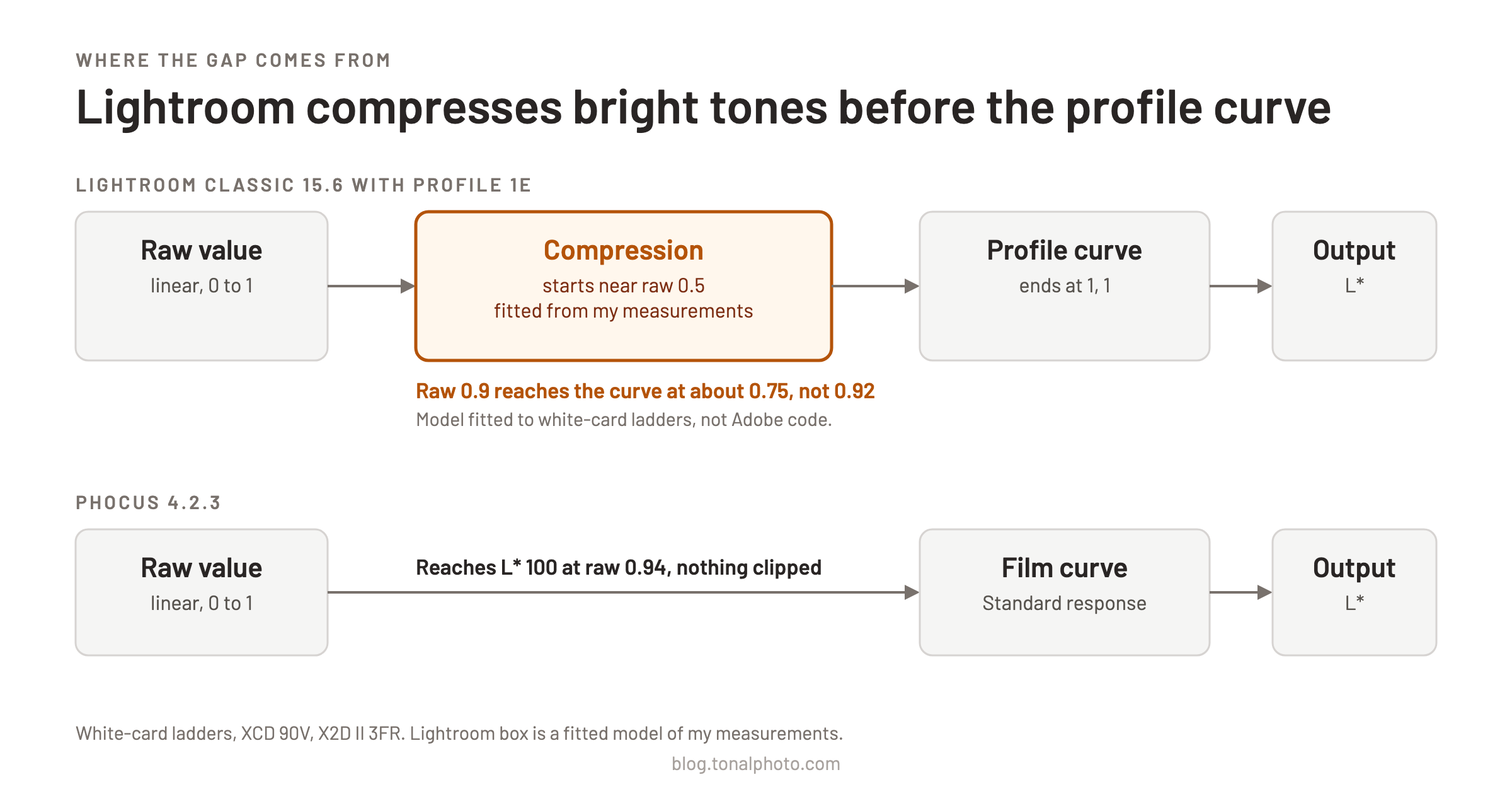
Figure 2. Where the compression sits. The Lightroom stage is a model fitted to my measurements, not a description of Adobe's code.
At equal raw level I also measured 0.02 to 0.06 log2 of variation between frames, roughly 0.5 to 1.5 L* near L* 93, so no static correction can be exact.
Pushed frames show the same compression
I shoot about two stops under and lift the exposure in Lightroom, so I tested whether the compression follows the raw level or the level after the push. If it followed the raw level, a dark frame pushed +2 would escape it and render brighter than a correctly exposed twin. I paired ladder frames shot one and two stops darker, pushed +1 and +2, with twins at matching levels (center raw 0.60, 0.75 and 0.95). The pushed frames came out 0.17, 0.65 and 0.63 L* darker than their twins, where a raw-level compression would have made them 1.5 to 2.6 L* brighter. The compression follows the level after Exposure. What causes the 0.2 to 0.65 L* residual is not established.
On 12 real frames shot 1.75 to 3.5 stops under with the XCD 25V and pushed +2 in both apps, the larger gap was color. Lightroom ran about 1 chroma unit (C*, the saturation scale) under Phocus at every level. Tones landing at 0.4 to 0.6 after the push were also 1.0 L* darker (median of 12 frames).
What to do about it
Leave Whites alone. Whites +30 to +40 closes the gap at near white. But on two frames, Whites +40 raised Lightroom's render by 2.9 L* at raw 0.95 and by 4.7 L* at raw 0.51, where the true gap is about 0.4 L*. A Whites value that fixes the top over-brightens tones around L* 85 to 95 by roughly 3 to 4 L*. I did not cover tones below L* 80.
The right shape is a point curve on the top half stop. The correction has to act only on roughly the last 0.6 stop before clipping and leave everything below alone. In Lightroom that means a point curve. No preset exists: the raised-curve tests above were diagnostics, and the curve I fitted was never exported.
The curve I built cost color. In my model's prediction, the fitted correction leaves a remaining lightness gap of 0.2 to 0.3 L* in most bins, 0.65 L* in the 0.6 to 0.7 bin and 0.54 to 0.97 L* in the top bins from 0.85 to 0.95. My model also predicts it desaturates near-whites, worsening the color difference to Phocus by 0.9 to 1.6 dE2000. That prediction was not checked against real exports. I chose not to ship it: "I'd rather have color more closely matched and just deal with the luminosity manually per image." That is what I do. I accept the 2 to 3 L* and adjust luminosity by hand, image by image.
Two earlier posts cover the noise side of shooting under and pushing in post² and what else Phocus does that Lightroom does not.³
What this page does not show
- Other profiles and cameras. Everything here is X2D II files through one custom profile. I did not test Adobe's own profiles or other cameras, so I do not know whether Lightroom does the same there.
- Other lenses, light and subjects. One lens (XCD 90V) for the ladders, one card, one light, lens corrections off.
- The cause. The compression is a model fitted to measurements, not a statement about Adobe's code.
The comparison I do not have is the same ladder exported with Adobe's own profile in place of 1e. Until it exists, read the 2 to 3 L* as a result for 1e only.
This page is one of four from the same profile project. The summary, with every limit on one sheet, is What a Lightroom camera profile can and cannot reproduce from Phocus.