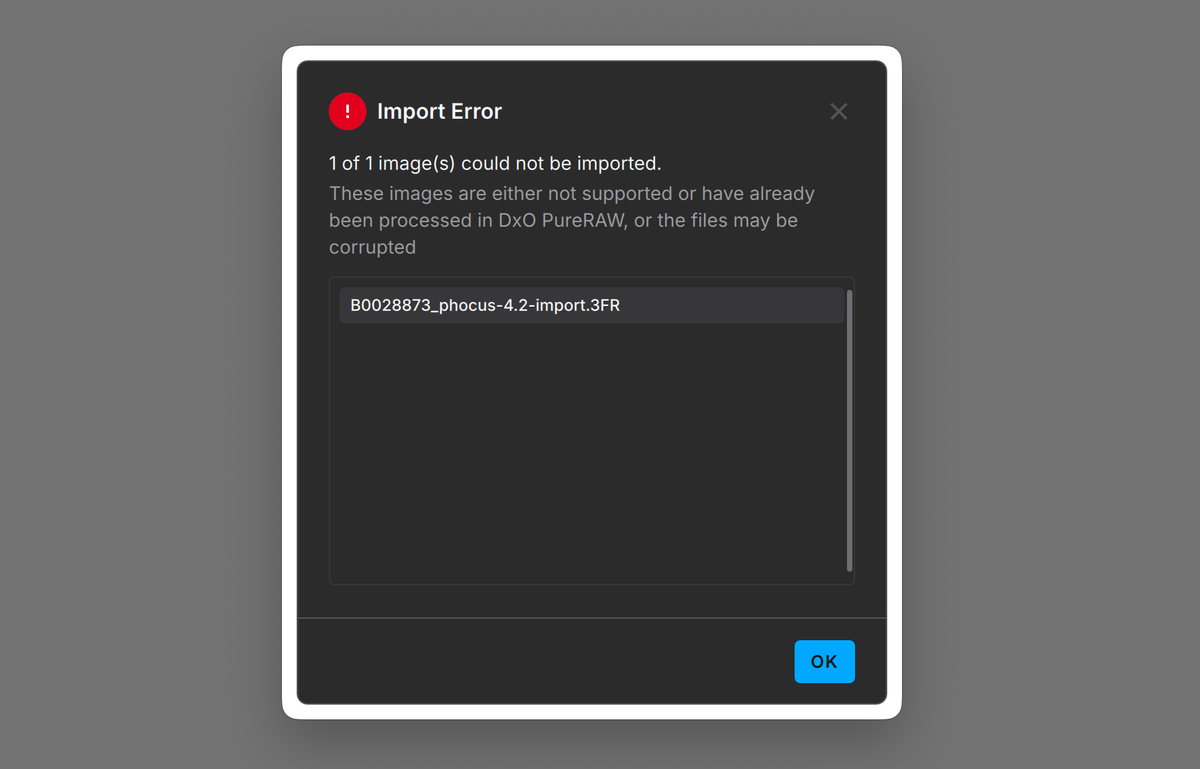
A blog reader flagged it first. After updating to Phocus 4.2, DxO PureRaw refused to open the 3FR files it had previously handled fine. His camera had not changed. His DxO version had not changed. The only thing that moved was Phocus.
That should not have been possible. The whole point of importing a 3FR through Phocus, the thing I have written here before and the thing Hasselblad's own workflow implies, is that the RAW lands on your disk exactly as it came off the card. In Phocus 4.2 that is no longer true. Import modifies the original RAW file: it rewrites the camera's EXIF Model tag and adds a private tag the camera never wrote. Hasselblad says the change is deliberate. Their own user manual says "the original file always remains". This post covers what changes, how to keep DxO working, and why Hasselblad's explanation does not hold up.
Key finding: Phocus 4.2 import modifies the original 3FR: the EXIFModeltag changes fromX2D II 100CtoHasselblad X2D II 100C, plus one added private tag. DxO PureRaw 5 and 6.3.1 reject the result; Lightroom opens it. 4.1.x imports were byte-identical. Hasselblad calls it deliberate, for Adobe compatibility; tests disagree. Workaround two sections down.
DxO PureRaw stops opening 3FR files after Phocus 4.2 import
It came in as a comment on my write-up of Phocus 4.2's import presets, and it was specific. Up to 4.1.2, import through Phocus and then into DxO PureRaw worked normally. After installing 4.2, everything else worked, but PureRaw would no longer open his 3FR files. The only variable he could name was the Phocus version.
My first answer was wrong. I told him Phocus only copies the RAW and writes a small sidecar, so the file DxO receives is bit-for-bit identical regardless of Phocus version, and that he should look at DxO instead. That answer was built on an assumption I had never actually tested at the byte level. So I tested it.
The fix, and which files are affected
Every 3FR that passes through Phocus 4.2 import is affected. The rewrite applies through the Standard import preset (and likely the other import presets as well), and there is no option to turn it off. Files copied from the card by hand, files imported directly into other software, and files imported by Phocus 4.1.x are untouched.
The fix is to keep the camera's original file away from Phocus import, or to put the model name back.
- Copy off the card yourself. Copy the 3FR files off the card using Finder (or an app like ImageIntact if you want extra peace of mind about the integrity of the copy), then point DxO (or Phocus) at that folder. A manual copy is byte-identical to the card, so DxO sees the camera's real model name and opens the file. This is the simplest path and it costs you nothing.
- Point DxO straight at the card. Same idea, one less step. Import into PureRaw directly from the card and skip Phocus for the files you are sending to DxO.
- Stay on 4.1.x if a Phocus-to-DxO pipeline is central to how you work and you do not need anything 4.2 added, like the new import presets.
- Repair files you have already imported. If the card original is gone and all you have is a Phocus 4.2 copy, you can put the original model name back with a metadata tool like ExifTool. Only the metadata changes; the image data is left untouched, so nothing is lost.
Until something changes on Hasselblad's side, if any part of your workflow leaves Phocus and lands in DxO, bring those frames off the card directly and let Phocus have its own copies.
Researching and writing the blog and page posts I produce takes up a lot of my time and costs me money for software subscriptions, tooling, and other incidentals related to running a business.
Please consider a paid membership to help me keep the lights on and pay the bills - it is only a fraction of the cost of an X2D II and a lens. Click on the button to go to the membership page to see the options available.
What does Phocus 4.2 actually change in your files?
I imported one frame through Phocus 4.2 and compared it against the same frame still sitting on the card. They are not the same file. The byte count is identical (212,832,256 bytes), but the hash is not. About 215 bytes change, all of them in the metadata header at the front of the file, and none of them in the raw sensor data. Phocus did not re-encode the image. It rewrote a small piece of metadata.
| EXIF field | Card original | After Phocus 4.2 import |
|---|---|---|
Model |
X2D II 100C |
Hasselblad X2D II 100C |
0xc51c |
absent | 0 (added) |
The camera writes Make: Hasselblad and Model: X2D II 100C. After import the Model reads Hasselblad X2D II 100C, so the brand now sits in both fields. The added 0xc51c tag is inert; the model string is the one that matters. I confirmed that by taking the imported file and changing only the model back to X2D II 100C: DxO opened it. Leave the model wrong and PureRaw refuses. DxO identifies the camera by matching the EXIF Make and Model against its list of supported bodies and needs an exact hit, so the prepended brand makes the lookup miss. Lightroom is more forgiving and opens both forms.
The same import on Phocus 4.1.1 produced a byte-identical copy: same hash, no rewrite, no added tag. This is new in 4.2, which is why the reader's DxO pipeline worked before the update and broke after it. Phocus should not be rewriting a file it is meant to ingest untouched, and DxO is brittle for rejecting a file whose pixels are perfect. The one you can act on is Phocus.
Have you seen the guide? I've published Essential Phocus 4.x for Mac - 85 topics across 8 sections and 251 pages covering everything from HNCS color science to HDR workflows. It's the reference manual Hasselblad hasn't updated since 3.8. It's $49, and updates are included.
What does non-destructive mean in Phocus's own manual?
Every serious RAW application, Lightroom, Capture One, DxO, treats the original as read-only and stores edits separately. Phocus makes the same promise in writing, and it is part of what you keep when you shoot through Phocus. The current manual says “all edits are nondestructive in Phocus and so 3F files remain unaffected and can be recalled at a later date as identical as they were when first processed from the raw data,” and that “you cannot ‘press the wrong button’ in Phocus because the original file always remains.”
A file whose checksum no longer matches the card is not a file that “remains unaffected.” Phocus 4.2 import is destructive by the manual’s own definition, and none of it is disclosed: the 4.2 release notes (June 2, 2026) cover Output Presets, Brush Mask, Exposure, the update notifier, and HDR export, and say nothing about import writing to RAW files.
That silence has a practical edge. If you verify your copies by checksum, every Phocus 4.2 import now reports a mismatch against the card, indistinguishable from a corrupted copy. And once import edits originals without telling you, every other Phocus operation inherits the doubt.
Hasselblad's official verdict: by design
I reported this to Hasselblad on June 28 with the sample files and the byte-level comparison, and it went on the running Phocus known-issues list (Case #10227174). Engineering's verdict came back on July 3: the rewrite is deliberate. In their words:
"current versions of Adobe software validate the Model field and require it to be in the format 'Hasselblad X2D II 100C' in order to properly recognize the camera. Therefore, our engineering team adjusted the import behavior in Phocus 4.2 to ensure compatibility with Adobe applications."
That is the entire technical justification: Adobe requires it.
Then, on July 8, that justification came apart in Hasselblad's own words. After a second engineering review, support wrote that "Adobe does not have any issues recognizing 3FR files" and that "Only some FFF files may be unrecognizable in LR Classic 15.3 and later versions." So the Adobe problem, by Hasselblad's own account, is an FFF problem, not a 3FR one. Their reason for still rewriting the 3FR file: "only the camera model information is aligned with the FFF file." Consistency with the FFF path, not Adobe compatibility.
Why that explanation does not hold up
That rationale did not survive testing. Lightroom Classic 15.4.1 with Camera Raw 18.4 imports 3FRs straight off the card, carrying the camera-written Model value X2D II 100C, and recognizes the camera correctly. It accepts the rewritten files too. Current Adobe software tolerates both forms, so the rewrite solves a problem that does not exist.
The simpler hole in the argument: the camera already writes the prefixed form, Hasselblad X2D II 100C, into the UniqueCameraModel tag at capture, and Phocus 4.2 leaves that tag alone. Any Adobe code that wants the prefixed identifier has it on every file straight from the card, no rewrite required.
And if Adobe genuinely required the prefixed Model tag, a rewrite inside Phocus import would be the wrong fix. It only touches files that pass through Phocus. Photographers who load cards directly into Lightroom, the exact population an Adobe compatibility fix is aimed at, get the camera-written value. The only change that would reach them is camera firmware.
Hasselblad's July 8 reply settles this from their side. My testing showed Adobe reads the camera-written 3FR value; their engineering now says it outright. The reason given for touching the 3FR file, Adobe compatibility, does not apply to the 3FR file at all. What remains is a metadata change made to match the FFF path, and it is that change which breaks DxO.
Where this stands now
On July 3 I sent Hasselblad engineering a formal rebuttal with the test results above. On July 8 engineering answered, and the answer was a partial retreat: they conceded Adobe reads 3FR files without trouble and narrowed the recognition problem to some FFF files, while keeping the 3FR Model rewrite for consistency with the FFF path.
Their reply also leaned on a narrower promise than the manual makes. Engineering wrote that Phocus preserves the "original image information," meaning the pixels. The manual promises more than the pixels. It says "3F files remain unaffected" and "the original file always remains." The image data is safe. The file is not: import still changes about 215 bytes. Those are two different promises, and only one of them is being kept.
I have written back asking engineering to stop changing the 3FR file on import (restore the 4.1.x byte-identical behavior, or add an option that leaves it untouched), to fix the Model value in camera firmware instead so every file is correct at the source, and to correct the manual if the rewrite stays. I will update this post when they answer.
Update, July 14, 2026: they answered, and the answer is final. Engineering's closing reply restates that import is not a direct copy of the card file and that the Model rewrite exists to align 3FR imports with the FFF path, and it points to copying files off the card manually as the way to keep them untouched. Neither of my two questions got an answer: no firmware-side fix, no release-notes or manual correction. The reply closes with "This is the final response from our engineers."
The bug is tracked on the Phocus known-issues list with its current status: won't fix (by design), final as of July 14, 2026. The workaround section above is now the permanent answer: keep card originals away from Phocus 4.2 import for anything DxO needs to see.
Related: Phocus 4.2.1 shipped on July 15, and its changelog does not say whether it touches this.
4.2.2 followed five weeks later on August 20 and its changelog doesn't mention this either; see Phocus 4.2.2 for Mac: HEIF Fixes, Language Switching, Smoother Zoom.
The Model-tag rewrite is one of several undisclosed changes tracked on the Phocus 4.x release notes ledger.
References
- DxO PureRaw - camera and optical-module support is updated between versions.
- ExifTool by Phil Harvey - metadata read and write used for the comparison.
- Adobe Digital Negative (DNG) Specification 1.7.1.0 (PDF) - defines
UniqueCameraModelas a non-localized camera name that should include the manufacturer's name and "may be used by reader software to index into per-model preferences and replacement profiles." - Hasselblad Phocus User Manual (PDF) - source of the nondestructive-editing statements quoted above.
- Phocus 4.2 Mac read-me, June 2, 2026 (available from Hasselblad's Phocus page) - the complete 4.2 release notes, checked for any mention of the import change.