If you read this blog, you know the refrain: stay on Phocus 4.1.1, skip 4.1.2. The two 4.1.2 regressions were bad enough to avoid, and Phocus 4.2 cleared them, so the wait is over. I walked through that upgrade in an earlier post.
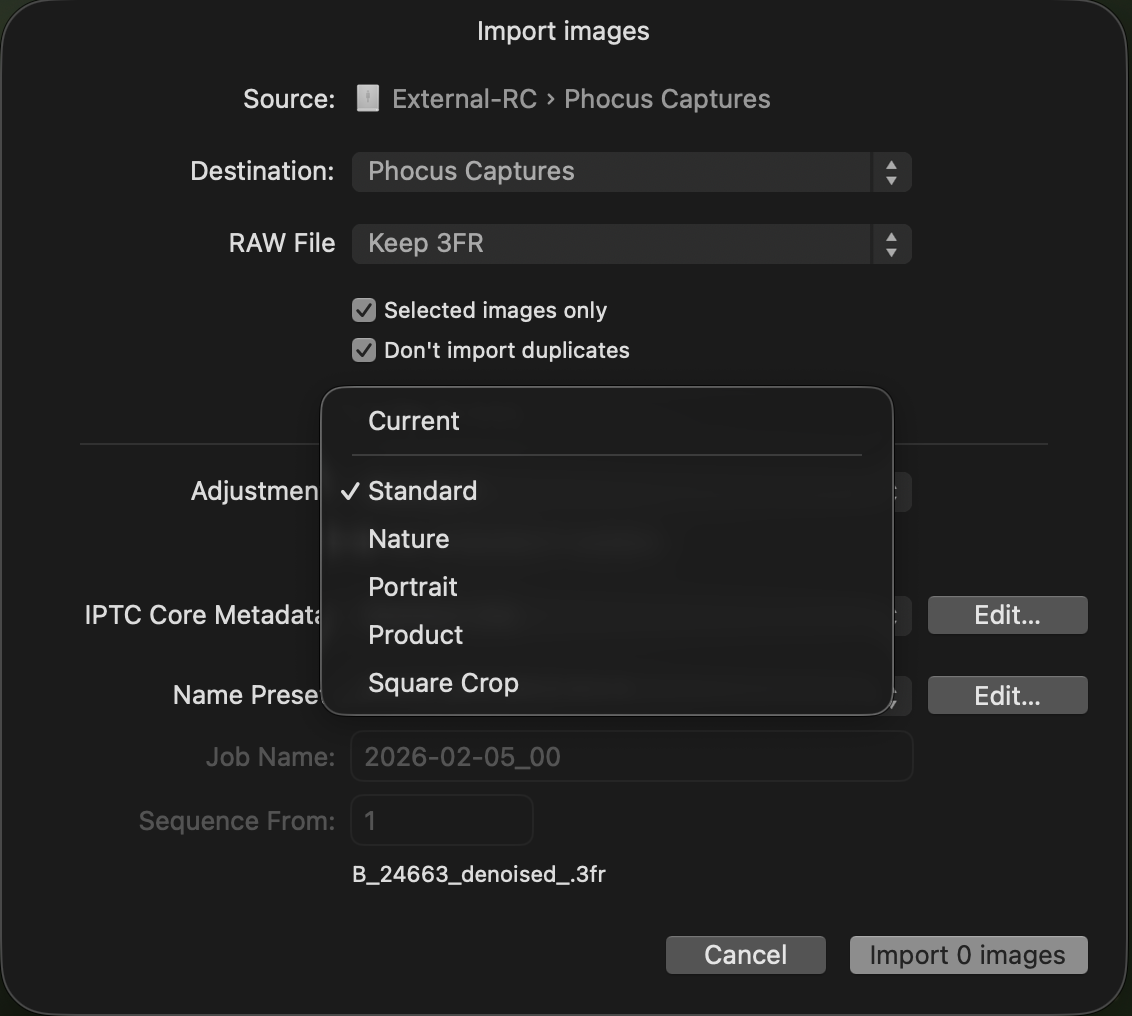
The regression fixes weren't the whole release, though. Hasselblad's notes led with new features and never mentioned the regressions at all, and they skipped a quieter fix too, one I'd been tracking since Phocus 4 first shipped last August. If you import your .3FR files with an HNCS preset selected, this one is for you. The Import dialog's Adjustment dropdown finally does something. The catch is that Phocus won't tell you it did.
Key finding: Correction (2026-08-07): I originally wrote that Phocus 4.2 applies the HNCS preset you choose at import. Pixel-level testing shows it doesn't: importing leaves files in an unlabeled "3FR" state, and manually switching to the chosen preset afterward changes the image by double digits of RMSE. The preset name gets recorded. The render doesn't change. Details below.
Update (2026-08-09): The correction above needs its own correction. Testing with fresh camera files shows the import preset is applied when "Use embedded if available" is unticked in the Import dialog. With the box ticked (it is ticked by default, and re-ticks itself every time Phocus relaunches) the preset is recorded but not rendered, exactly as described below. My June observation and the August one were both real: the checkbox decides. The featureless test frame behind the August measurements turned out to refuse the preset even with the box unticked, which is what made those tests read as "never applied".
Did Phocus 4.2 fix the import preset bug?
Only if you untick "Use embedded if available" in the Import dialog (see the 2026-08-09 update above). With the box ticked, the default, importing does not apply the preset to the render, it just records the name. I measured this on 4.2.0 and 4.2.1 with 16-bit TIFF exports and ImageMagick: switching from the as-imported "3FR" state to a named preset changes the image by about 10.4% RMSE of the full 16-bit range, with mean luminosity up roughly 24%. If import had actually applied the preset, that switch should change nothing. It does not.
For the better part of a year, that dropdown did nothing. You picked Nature, you picked Portrait, you imported, and every file landed at the plain Standard rendering anyway. I documented the original behavior in my Phocus 4.x guide; the short version is that import-time preset selection had no effect at all under the default import settings. If you are on 4.1.x, the default import flow behaves the same way there.
Update (2026-08-07): everything above about Phocus 4.2 applying the import preset is wrong. I re-tested with actual pixel measurements instead of watching the histogram, and the preset gets recorded, not applied.
Researching and writing the blog and page posts I produce takes up a lot of my time and costs me money for software subscriptions, tooling, and other incidentals related to running a business.
Please consider a paid membership to help me keep the lights on and pay the bills - it is only a fraction of the cost of an X2D II and a lens. Click on the button to go to the membership page to see the options available.
Here is what I measured. Importing with Adjustment set to Standard, the default, leaves the file in the toolbar's unlabeled "3FR" state. I exported 16-bit TIFFs, then manually switched to Standard and exported again, and diffed them with ImageMagick. The two exports differ by about 10.4% RMSE of the full 16-bit range, with mean luminosity up about 24%, across essentially every pixel. If import had actually applied Standard, switching to Standard afterward should change nothing. It changes almost everything. I reproduced this identically on both Phocus 4.2.0 and 4.2.1.
The "Use embedded if available" checkbox I describe below changes only bookkeeping: the toolbar label, the preset name written into the .phos sidecar, and a Hasselblad RGB profile tag. The exported pixels are byte-identical whether it is checked or not.
I also retested Nature tonight, by eye, on 4.2.1, and got the same result as Standard: it lands in the unlabeled "3FR" state, and switching to Nature afterward visibly changes the render. Whatever I saw originally that looked like Nature and Portrait arriving rendered, I cannot reproduce it now, and the pixel test says it is not happening.
What I do not know: whether "3FR" or the named preset is the correct HNCS interpretation for an unadjusted import. There is a measurable difference between them, and I cannot yet say which side of that difference is right. I'm putting that question to Hasselblad directly, and I'll update this post when I have an answer.
Update (2026-08-09): measured. Phocus Mobile 2, which has no preset choices, renders the same 3FR within 0.21% RMSE of the manually applied Standard preset and 10.2% away from the as-imported baseline, which points at Standard, not "3FR", as the HNCS render: Phocus for Mac Imports Aren't HNCS by Default.
Why can't you tell which preset is applied?
Because Phocus 4.2 does not surface it anywhere obvious, and per the update above, it turns out the preset does not shape the render at import under the default settings either. The preset name is written to the edit history and the .phos sidecar, but the pixels stay in the unlabeled "3FR" state until you manually reapply the preset. The RGB curve for the named preset does not appear in the Curves tool because the image was never bent by it in the first place.
Switching the Adjustments dropdown to Standard and watching the histogram jump is what first tipped me off that something was wrong. If the preset had actually applied at import, that switch should do nothing. Instead it moves the whole image, which is exactly the pixel-level effect I measured above. The preset name is still recorded in the image's sidecar file once you commit an edit, so the information exists. With the default import settings it never reaches the render.
Have you seen the guide? I've published Essential Phocus 4.x for Mac - 85 topics across 8 sections and 250 pages covering everything from HNCS color science to HDR workflows. It's the reference manual Hasselblad hasn't updated since 3.8. It's $49, and updates are included.
The bottom line
4.2 is still the version to be on for the regression fixes covered in the linked post, but the import-preset behavior is conditional: the preset applies only with "Use embedded if available" unticked, not in the default flow I originally described. See the update above. I will follow up once Hasselblad tells me whether "3FR" or the named preset is the correct rendering, and I will keep the fix-and-bug status current on the Phocus known issues page in the meantime.Phocus known issues page.
Related: Phocus 4.2.1 shipped on July 15 with eleven words of release notes.
Related: the other 4.2 import-time change: it rewrites your camera's EXIF model name.