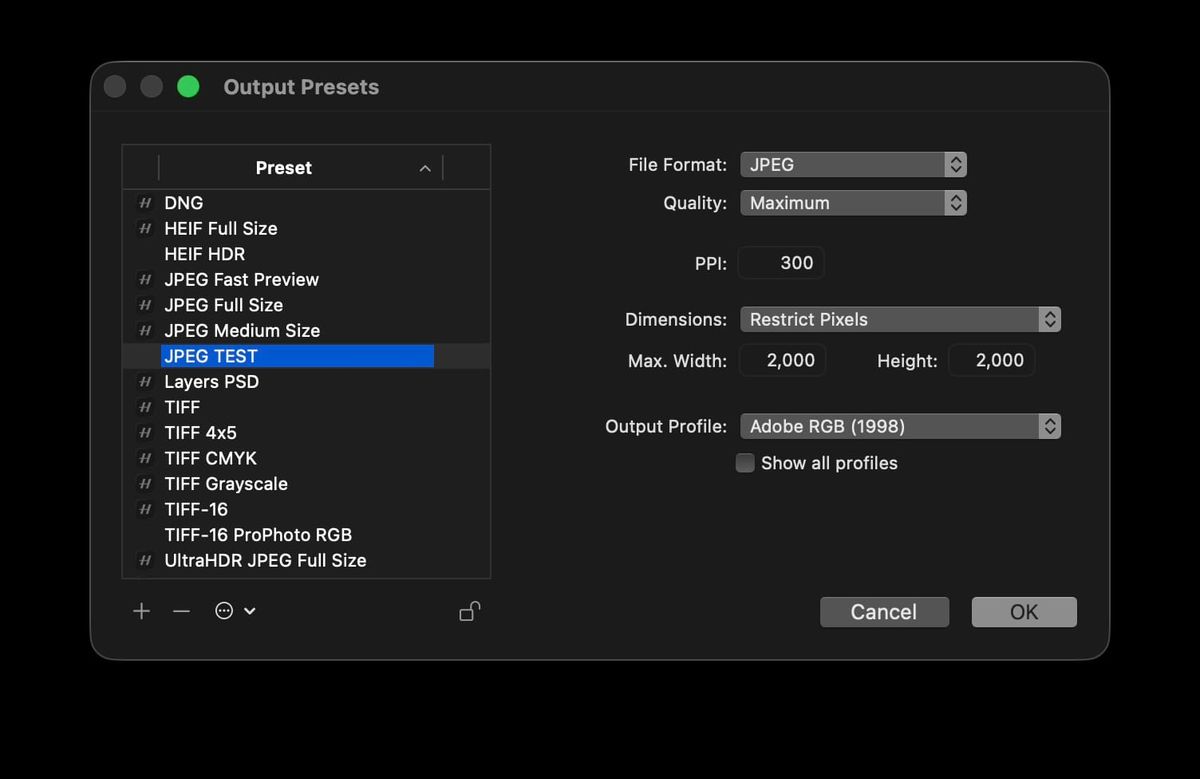
If you shoot Hasselblad and use Phocus 4.1.2 on Mac to export JPEGs, the file you get is not the size you asked for. Every JPEG export from 4.1.2 comes out at 7000×5250 pixels regardless of whether your output preset specifies Full Size, Restrict Pixels 2000, Restrict Pixels 5000, or anything else.
This is the second confirmed regression in Phocus 4.1.2's core functionality. The first, a critical color preview bug that makes every Hasselblad raw render flat and desaturated by default, is the worse of the two. The export bug here gives you a wrong-sized JPEG, which is recoverable: re-export from 4.1.1 and you have the right file. The color bug means every editing decision you have made in 4.1.2 was made against a wrong reference image. Between the broken preview pipeline and the broken JPEG export pipeline, 4.1.2 is not a usable version of Phocus for any photographer who cares about color accuracy or output dimensions.
Two Hasselblad shooters from different communities reached out to me about this export bug in the last five days. Both were on 4.1.2. Both were hitting the same silent downsize. The Dimensions field in your Output Preset is not being honored.
A note on support: This post represents my personal exploration and testing, not official technical support or guidance from Hasselblad. If you need assistance with your Hasselblad equipment, please contact Hasselblad directly: customersupport@hasselblad.com for global support, support.us@hasselblad.com for the Americas, or visit hasselblad.com/support for regional options.
Key finding: Phocus 4.1.2 silently caps every JPEG export at 7000×5250 regardless of preset settings. This is the second confirmed 4.1.2 regression in core functionality, alongside the critical color preview bug that breaks default raw rendering. 4.1.2 is not a usable version of Phocus. Downgrade to 4.1.1.
How can you tell if you're affected?
The fastest check: open any X2D II 100C raw file in Phocus 4.1.2, set your output preset Dimensions to "Full Size," and export a JPEG. The native sensor resolution on the X2D II 100C is 11656×8742 pixels. If your exported JPEG comes out at 7000×5250 instead of 11656×8742, you're hit.
The same check works for Restrict Pixels. Configure a preset for Restrict Pixels 2000×2000 (which should produce a 2000×1500 JPEG on a 4:3 source) or 5000×5000 (which should produce 5000×3750), export, and check the file's actual dimensions. Every output comes out at 7000×5250 regardless of which Restrict value you set.
I tested on an X2D II 100C, where native 11656×8742 raw files come out at 7000×5250 JPEGs. The bug lives in Phocus's export resize pipeline rather than in any camera-specific code, so the other 100MP bodies that share these source dimensions (X2D 100C, H6D-100c) would likely show the same 7000×5250 output. 50MP bodies (X1D II 50C, H6D-50c) would presumably hit the same code path with a different fixed output dimension. I have not tested any of those bodies directly.
The bug is not JPEG-specific. After the initial JPEG tests I ran the same comparison for TIFF (both 8-bit and 16-bit) and HEIF, with both custom presets and the built-in canned full-size presets. Every output came out at 7000×5250. The file size differences between the two TIFFs (110 MB at 8-bit versus 221 MB at 16-bit) and between the two HEIFs (2 MB versus 13 MB) confirm Phocus is honoring bit depth and quality per preset, so the format-specific encoders are working. Only the Dimensions code path upstream of every encoder is broken. DNG is the one export format I have not tested.
What is actually happening?
Other preset settings still work correctly in 4.1.2. JPEG quality, TIFF bit depth, color profile (Adobe RGB versus sRGB), chroma subsampling, all reflect the active preset. Only the Dimensions code path is broken. The scale factor is uniform across every test and every format: 0.6005 in each direction, regardless of which Dimensions option you select.
Phocus also writes no log entries for the export operation itself. The Phocus.log captures preview generation for the source raw file but is silent during the actual export, so there is no diagnostic trail to follow.
The same export operations work correctly under Phocus 4.1.1 on the same hardware. Full Size produces native 11656×8742, and Restrict Pixels caps are honored across JPEG, TIFF, and HEIF. This is a regression introduced specifically in the 4.1.1 to 4.1.2 update.
Researching and writing the blog and page posts I produce takes up a lot of my time and costs me money for software subscriptions, tooling, and other incidentals related to running a business.
Please consider a paid membership to help me keep the lights on and pay the bills - it is only a fraction of the cost of an X2D II and a lens. Click on the button to go to the membership page to see the options available.
The only confirmed fix: downgrade to 4.1.1
There is no in-app workaround. Restarting Phocus, rebuilding presets, switching to the built-in canned JPEG preset, none of those change the output. The only thing that produces correct JPEG export sizes is dropping back to Phocus 4.1.1.
Between this bug and the Phocus 4.1.2 critical color preview regression that affects every Hasselblad raw file's default rendering, 4.1.2 has shipped with two material regressions in core functionality at the same time. The export bug is the milder of the two. A wrong-sized JPEG is recoverable. The color preview bug means every editing decision you have made against the 4.1.2 default preview has been made against a wrong reference image. Both bugs share a fix: downgrade. Hasselblad publishes the 4.1.1 installer on their support site.
Status with Hasselblad
I filed a detailed bug report with Hasselblad support on 2026-05-20. The report includes full reproduction steps and a 4.1.1 versus 4.1.2 control test. The evidence package contains the source raw file, four mis-sized JPEG exports demonstrating the bug across different preset configurations, four screenshots of the Output Preset dialog at each configuration, a screen recording of the full export sequence, and the Phocus.log. Hasselblad's support system acknowledged the ticket within seconds. The customer-facing case number arrives with the first human triage response, typically within one business day.
This is now the second 4.1.2 regression I've reported. The first, the color preview bug, has already been reproduced by Hasselblad engineering with a fix committed for a future release. I will update this post when a fixed version of Phocus ships.
Update 2026-06-04: Phocus 4.2 fixes this. A full-size JPEG from an X2D II 100C now exports at the native 11656×8742 instead of the 7000×5250 cap. Details: Phocus 4.2 fixes both 4.1.2 regressions.
What you should do now
If you shoot Hasselblad and edit in Phocus 4.1.2 on Mac:
- Downgrade to Phocus 4.1.1. Between the JPEG export size bug and the critical color preview regression, 4.1.2 is not a usable version of Phocus for any photographer who cares about color accuracy or output dimensions. Hasselblad's support site has the 4.1.1 installer.
- Check the dimensions of any JPEGs you've already exported from 4.1.2 before delivering them to a client or uploading them anywhere with strict size limits.
- If you have done any color or tone work in 4.1.2 against the default preview, treat it as suspect. The preview was not showing you your actual file's colors. See the color preview regression post for the impact.
- Consider filing your own ticket with Hasselblad support. Reference "Phocus 4.1.2 JPEG export ignores configured Dimensions" so they can match it to the existing report.
For a running list of other Phocus 4.x bugs and their current status, see Phocus 4.x for Mac: Known Issues and Bug Reports.
References
- Phocus 4.1.2 Has a Critical Color Preview Regression
- Phocus 4.x for Mac: Known Issues and Bug Reports
- Hasselblad Phocus download page
- Hasselblad customer support
[BUY ME A COFFEE - replace with HTML card]
[SIGNUP BLOCK - add manually]