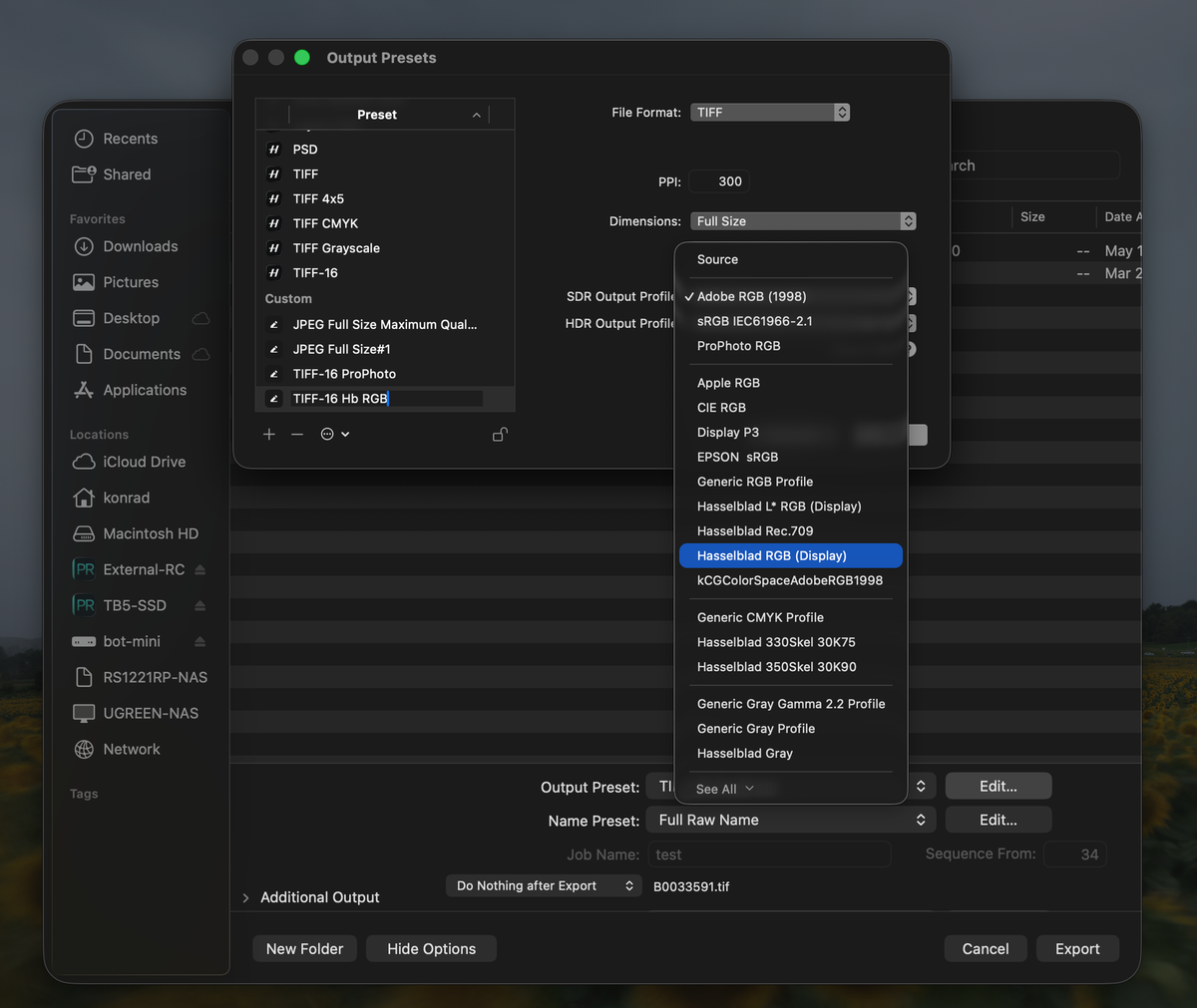
The built-in TIFF-16 preset exports in Adobe RGB (1998), and for most work that is the right choice. This is about the cases where it is not: when you want the file to stay in the space Phocus rendered it in rather than converted on the way out, when you want one space across every handoff between Phocus and Lightroom, or when you want to soft proof against that space before you deliver. Those are the cases where the absence below starts to matter.
Hasselblad RGB does not appear in Hasselblad's own export menu. Open the output profile list in Phocus for Mac, scroll down to the Hasselblad entries, and you get Rec.709, a couple of CMYK profiles, and Hasselblad Gray. What you do not get is Hasselblad RGB, the working space Phocus renders into.
If you have ever been told that the way to get a Hasselblad RGB file out of Phocus is to set the output profile to Source, there is a reason that became the standard advice. The same absence follows your files into Lightroom, where Hasselblad RGB cannot be chosen for soft proofing or for export either.
Key finding: TheHasselblad RGB.iccandHasselbladLStarRGB.iccprofiles Phocus installs carry ICC device classscnr(Input) instead ofmntr(Display). Phocus for Mac and Lightroom Classic both filter output profiles by device class, so neither offers them. Byte identical in Phocus 4.1.1 through 4.2.1. The color data is correct; only the label is incorrect.
Why is Hasselblad RGB missing from the export menu?
Because the profile Phocus installs is labeled as the incorrect kind of profile. Neither application shows it as a result, and no setting in either one will bring it back.
Every ICC profile carries a field saying what kind of thing it describes. Monitor and color space profiles are tagged mntr (Display). Scanner and camera characterization profiles are tagged scnr (Input). It is four bytes, twelve bytes into the file, and it exists so applications can tell the difference between a space you can render into and a description of some device's capture behavior.
Applications take that field seriously. An Input profile is not meant to be an output space, so neither application offers it as one.
Three of the RGB profiles Phocus ships are tagged scnr:
| Profile | Device class | Should be |
|---|---|---|
Hasselblad RGB.icc |
scnr (Input) |
mntr (Display) |
HasselbladLStarRGB.icc |
scnr (Input) |
mntr (Display) |
HasselbladLStarRGBv1.icc |
scnr (Input) |
mntr (Display) |
The rest of the set is tagged correctly. Hasselblad Rec709.icc, Hasselblad Rec2100PQ.icc and Hasselblad Gray.icc are all mntr. Hasselblad Lab.icc is spac. The two CMYK print profiles Phocus ships are prtr, which is right for a printer.
Two of the three matter in practice. Phocus installs a subset of its bundled profiles into ~/Library/ColorSync/Profiles/, where other applications can find them. Hasselblad RGB and Hasselblad L* RGB get installed. The v1 file never leaves the application bundle, so nothing outside Phocus has ever seen it.
Why "just use Source" became the standard advice
Phocus filters its own output profile list the same way Lightroom does, so Hasselblad RGB fails Phocus's own filter!
If you have used Phocus for any length of time you might already know the workaround, even if you never knew it was a workaround. You want a file in Hasselblad RGB, you cannot find Hasselblad RGB in the dropdown, so you set Output Profile to Source. Source tells Phocus to skip the conversion and embed whatever space the image is already in, which is Hasselblad RGB. That is worth being specific about, because it is the whole reason Source produces the file you want. The clearest evidence I have for it came out of the 4.1.2 color preview regression: that bug broke the default preview specifically for the Hasselblad RGB working space, and switching the working space away from it in the Reproduction tool restored a correct render. A regression that selective is hard to explain unless the default path renders in Hasselblad RGB. Source for Adobe workflows is the advice I have documented in the Phocus guide, and the advice that circulates among Hasselblad shooters.
Source is correct and it produces the right file. But the reason it is the only route is that Hasselblad's rendering space is invisible to Hasselblad's own export menu.
That rendering space now has published numbers instead of a marketing adjective. I decoded both Hasselblad working-space profiles out of the Phocus bundle and measured their primaries, which settles how much wider than Adobe RGB it actually is, and what an Adobe RGB export costs in practice: Hasselblad RGB Is Wider Than Adobe RGB.
The device class can be corrected, and after that the profile appears in the Phocus dropdown next to Adobe RGB and ProPhoto RGB, where it can be picked directly. I exported a TIFF from Phocus 4.2.1 using the corrected icc file. The file carries the corrected profile embedded, and every colorimetric value in it matches Hasselblad's original: same D50 white point, same primaries, same tone curves. The only difference is that one field and the name.
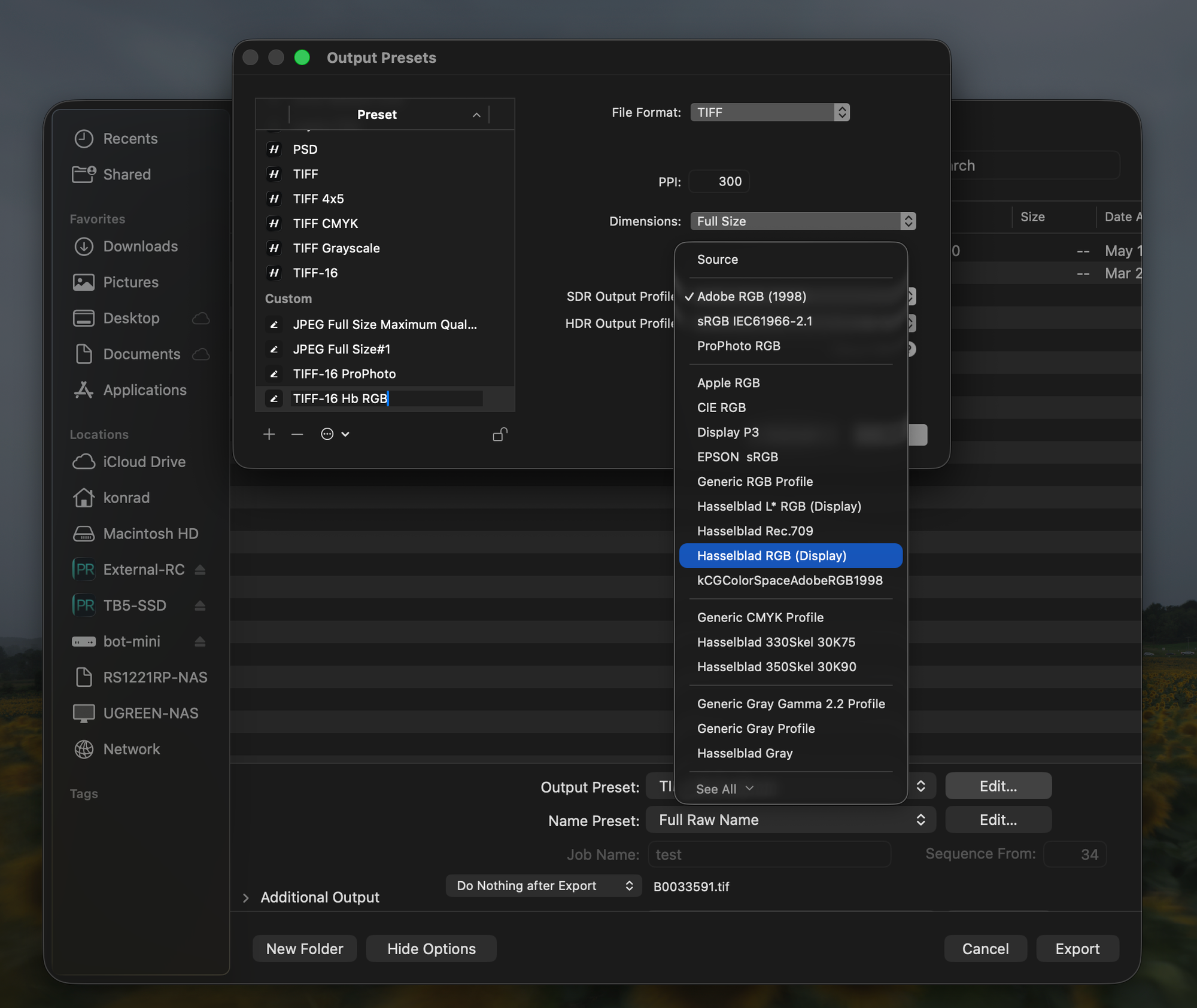
The Phocus output profile list after correcting the profile. Hasselblad RGB (Display) is the corrected copy. The original Hasselblad RGB is absent, because Phocus filters it out.
Have you seen the guide? I've published Essential Phocus 4.x for Mac - 85 topics across 8 sections and 250 pages covering everything from HNCS color science to HDR workflows. It's the reference manual Hasselblad hasn't updated since 3.8. It's $49, and updates are included.
The Lightroom half
Lightroom Classic keeps a master list of every profile it considers eligible and a shortlist that appears in the menus. You reach the master list through Develop → Soft Proofing → Profile → Other…, or Export → File Settings → Color Space → Other…, and tick what you want (make sure to check the "Display" checkbox first to get all the display profiles).
Hasselblad RGB and Hasselblad L* RGB are not in that master list at all. You cannot tick them into the menus, because they never make it as far as the chooser.
This matters for anyone running the Phocus to Lightroom handoff. You can bring a file into Lightroom in Hasselblad RGB, edit it, and then find you cannot send it back out in the space it arrived in. ProPhoto RGB or Adobe RGB is as close as you get.
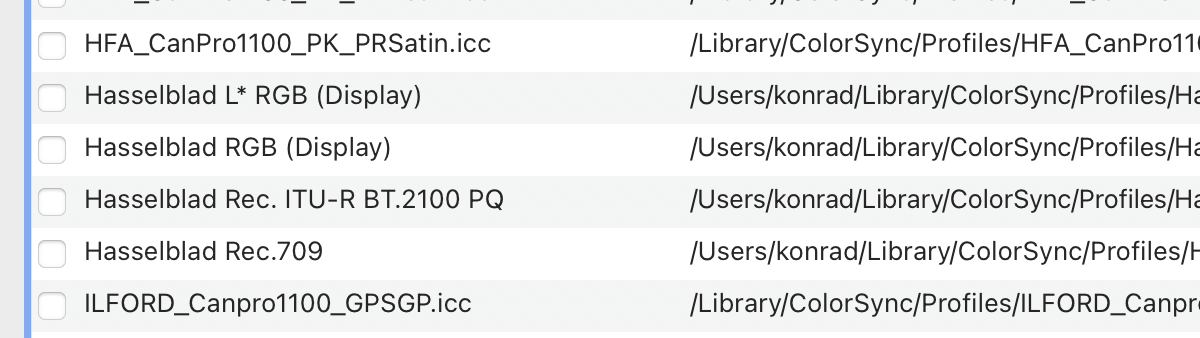
The same two corrected profiles in Lightroom's Choose Profiles dialog. Before the correction, only the Rec.709 and Rec.2100 PQ entries appeared here.
This is not a missing file. Phocus already installs these profiles exactly where Lightroom looks for them. Lightroom finds them, reads them, and filters them out because they are designated as scanner profiles.
Researching and writing the blog and page posts I produce takes up a lot of my time and costs me money for software subscriptions, tooling, and other incidentals related to running a business.
Please consider a paid membership to help me keep the lights on and pay the bills - it is only a fraction of the cost of an X2D II and a lens. Click on the button to go to the membership page to see the options available.
What is not broken
Your existing files are fine. Importing and choosing are separate code paths in Lightroom. On import nothing is picked from a menu: Lightroom reads whatever profile is embedded in the file, uses it to interpret the pixel values, and converts the result into its internal working space for editing, the same as it does for every file. That path never checks the device class; the filter only guards the menus where you select a profile, in soft proofing and export. I tested the import path with two TIFFs carrying byte identical pixel data, one tagged with the shipped Input class profile and one with a corrected copy, and compared them side by side in Lightroom. They render identically, with matching histograms. Nothing about a file already in Hasselblad RGB is damaged or misread.
No color value is incorrect. The white point, primaries and tone curves inside these profiles are all correct and untouched. The space they describe is the space Hasselblad intended.
Phocus renders correctly. It uses these profiles internally without any trouble at all.
What breaks is selection. You cannot pick these spaces as a soft proof or export target, in either application. That matters in two ordinary situations. If a file arrived in Lightroom as a Hasselblad RGB TIFF, you cannot send it back out in the space it came in, so those edits end up in a different space from the rest of your archive. And you cannot soft proof against Hasselblad RGB to see whether an edit has pushed colors outside it before you export.
This is not new
I checked the profiles in four Phocus releases:
| Phocus version | Hasselblad RGB.icc |
HasselbladLStarRGB.icc |
|---|---|---|
| 4.1.1 | scnr |
scnr |
| 4.1.2 | scnr |
scnr |
| 4.2 | scnr |
scnr |
| 4.2.1 | scnr |
scnr |
Identical bytes across all four, with identical file sizes. The profiles carry internal creation dates of October 2004 and June 2012, which suggests this predates every version I have archived.
How do you get Hasselblad RGB back in the export list?
Correct the device class on the profiles installed on your own Mac. It is a one field change, it takes about five seconds, and both applications pick it up on their next launch.
The correction is one field. scnr becomes mntr, and nothing else in the file changes.
That works because these profiles already carry everything the ICC specification requires of a matrix and tone curve Display profile: description, copyright, media white point, the three colorant tags and the three tone curves. The white point is D50, so no chromatic adaptation tag is needed. The profile ID field is zeroed, so there is no checksum to recompute. Changing the class produces a valid Display profile with no other edit.
I wrote a small tool that does it properly which you can download from hasselblad-icc-profile-fix on GitHub. The code is open source and you can inspect it to see exactly what it does.
curl -O https://raw.githubusercontent.com/kmichels/hasselblad-icc-profile-fix/main/hb-icc-fix.py
python3 hb-icc-fix.py            # shows what it would do, writes nothing
python3 hb-icc-fix.py --install  # applies it
It reads the profiles already installed on your own machine and writes corrected copies alongside them, named Hasselblad RGB (Display) and Hasselblad L* RGB (Display). Your originals are untouched, and --uninstall reverses it. It carries no Hasselblad files of its own, which is what makes it publishable.
It deliberately never writes inside the Phocus.app bundle. Editing an application bundle breaks its code signature, and the next Phocus update would overwrite the change anyway.
Restart both applications afterward, since each reads the profile folder only at launch. And in Lightroom, remember to tick the new profiles in that Other… chooser so that they show up in the menus.
One caveat I have not tested: a future Phocus update might remove the corrected copies (or hopefully fix them!), depending on how its installer treats that folder. The corrected files have different names from Hasselblad's, so an installer that only writes its own files should leave them alone. If they disappear after an update, run --install again.
What happens now
This had already been raised with Hasselblad support before I went looking, and the answer was the usual acknowledgement that it would be passed along. I have filed my own report with the version sweep, the three affected profiles, and the Phocus side of it, which I think is the part most likely to get traction. It is one thing to tell a vendor their profile is awkward for Adobe. It is another to show that their own application cannot offer their own working space by name.
If you want to report it too, the useful version is specific: the Hasselblad RGB and Hasselblad L* RGB ICC profiles are authored with device class scnr instead of mntr, so neither Phocus nor Lightroom Classic offers them as output spaces. Skip anything about import being broken or color being incorrect, because neither is true, and one incorrect detail is all it takes for a report to be set aside.
I will update this post and the known issues tracker when there is a response worth reporting.
Update, August 20, 2026: Hasselblad senior engineering has reviewed the report, the script, and the test files, and confirmed the analysis. Both Hasselblad RGB and Hasselblad L* RGB are authored with device class scnr (Input) instead of mntr (Display), and that classification is why neither Phocus nor Lightroom Classic offers them as output profiles. The issue has been recorded for evaluation, with the wording that they will assess correcting the device class in a future software update. No version and no timeline were given. Until a release carries the fix, the correction tool above remains the way to get both profiles into the export lists.
References
- hasselblad-icc-profile-fix - the correction tool and full technical writeup
- ICC.1:2001-04 Specification - the profile header and its device class field
- A Complete Hasselblad RAW Workflow - the Phocus to Lightroom handoff this affects
- How HNCS Actually Works - what Hasselblad RGB is and where it sits in the pipeline
Want help setting up your own backup workflow? I offer one-on-one consulting for photographers who’d rather not spend a weekend Googling file structures and cloud services. It’s practical, friendly, and totally tailored to your gear and goals.