Short answer: no. If you are shooting just RAW, the X2D II captures the full dynamic range in every frame, and Phocus can render that data as HDR after the fact. You only need RAW+JPG or RAW+HEIF if you want the camera itself to embed an HDR JPEG or HEIF at capture time.
That said, the camera's HDR menu makes it sound like the answer is yes. The in-camera HDR toggle is the source of the confusion. Most X2D II shooters can ignore it without giving anything up.
Key finding: The X2D II HDR toggle only controls whether the camera writes an HDR JPEG or HEIF at capture. The RAW captures the full 15.3 stops of dynamic range regardless of toggle state. Any 3FR or FFF can be rendered as HDR in Phocus or Phocus Mobile 2, no JPEG sidecar required.
What does the in-camera HDR toggle actually do?
The HDR toggle on the X2D II is an output-format setting. When it is on, two things happen at capture: the camera locks metering to Smart Metering and pulls exposure back to protect highlights from clipping, and it renders an HDR-encoded JPEG or HEIF alongside (or instead of) the RAW. That HDR JPEG carries the SDR base image plus a gain map that HDR-capable displays read to extend the luminance range. The HEIF version does the same thing with PQ encoding.
What the toggle does not do is change what the sensor records. The X2D II captures the same data either way: a single RAW frame with roughly 15.3 stops of dynamic range, ready for whatever processing decision you want to make later.
HNCS HDR is a single-exposure technique. The whole pipeline is about encoding the dynamic range that the sensor already captured, not about combining multiple frames the way traditional bracketed HDR works on other camera systems. I covered the mechanics in What Is HNCS HDR and Why Should RAW Shooters Care?. The RAW file is complete on its own.
What about RAW files when the toggle is off or grayed out?
Phocus renders them as HDR anyway. The camera-side toggle has nothing to do with whether Phocus can apply HDR to a RAW file. The image format on the camera (RAW only, RAW+JPG, JPG only) controls what files the camera writes to the card. Phocus only needs the RAW. For the full picture of in-camera HDR limitations across every shooting scenario, see Part 4 of the HDR Demystified series, which is the closest companion to this post.
Open any X2D II 3FR in Phocus 4.x, check the HDR checkbox in the Adjustments panel, and the histogram expands to show the extended HDR luminance range. The same is true in Phocus Mobile 2: tap the HDR toggle on a RAW you imported, and the app renders it with HDR.
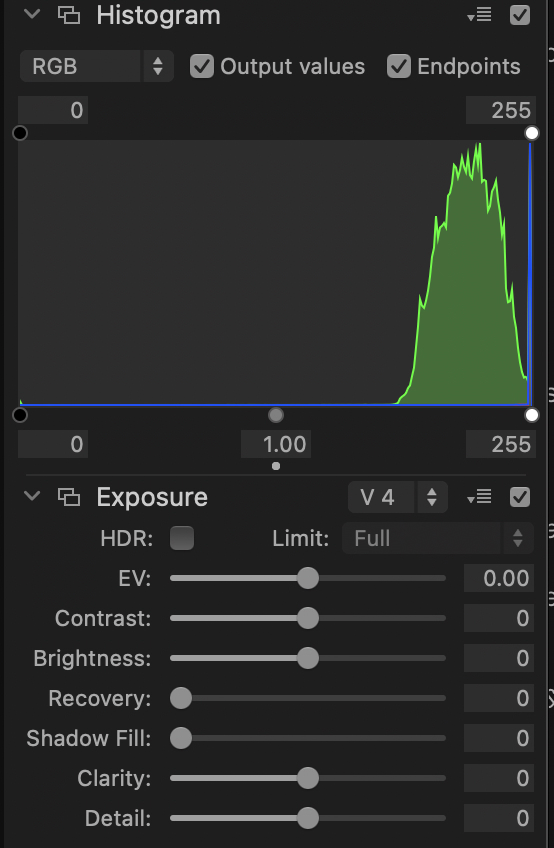
HDR off. The histogram and the file render inside the standard SDR luminance range, even though the underlying RAW carries more than that.
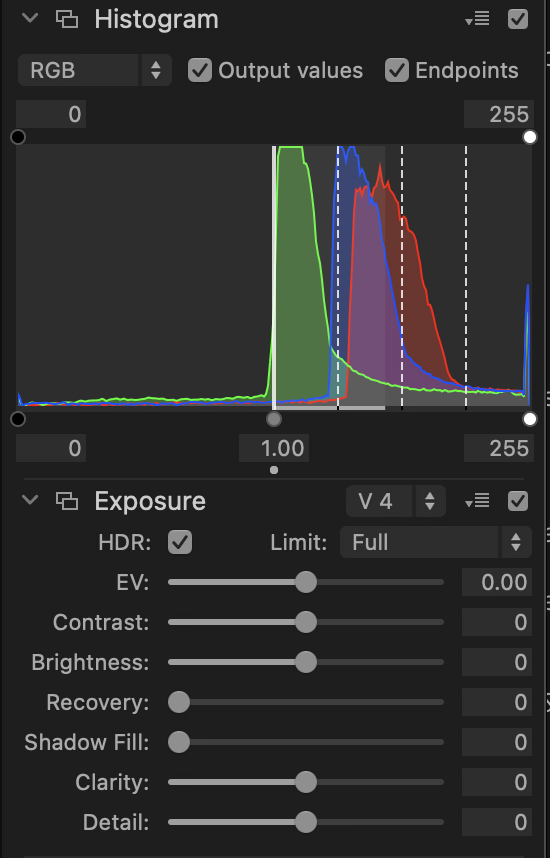
HDR on, same RAW. The histogram opens up to show the extended luminance range the file always contained. The camera-side toggle has no input over any of this.
The toggle on the camera grays out in a number of shooting modes. The grayed-out toggle is sometimes read as "HDR is unavailable for this shot." It is not. What is unavailable is the camera generating an HDR JPEG or HEIF at the moment of capture. The RAW still records the full dynamic range, and Phocus can render it with HDR at any point afterward.
| Shooting Mode | In-camera HDR toggle | RAW HDR in Phocus |
|---|---|---|
| Single shot, Auto / Av / Tv / P | Available | Yes |
| Manual exposure (M) | Grayed out | Yes |
| Continuous drive | Grayed out | Yes |
| Exposure bracketing | Grayed out | Yes |
| Focus bracketing | Grayed out | Yes |
| Nikon-compatible flash attached | Grayed out | Yes |
| RAW-only image format | Grayed out | Yes |
The right-hand column is the load-bearing one. Whatever the camera-side toggle is doing, Phocus can render the RAW with HDR.
The Phocus checkbox does change what the histogram reports, though, and unchecking it makes Phocus flag more clipping rather than less: X2D II Clipping in Phocus: Why the Histograms Disagree.
Why is there a misconception that RAW+JPG is mandatory?
The camera's HDR menu only shows the toggle when an image format with a JPEG or HEIF component is selected. Switch to RAW only and the option disappears. The natural reading is "HDR requires JPEG or HEIF," and most people stop there. That reading is true for in-camera HDR output, but the inference that follows ("therefore I must shoot RAW+JPG to have HDR") is not.
Sony, Canon, and Fuji all have in-camera HDR modes that genuinely require multiple exposures and produce a merged output. Anyone bringing that mental model to the X2D II reasonably assumes "HDR mode" means the same thing, and that of course you need an output format that can carry the merged image. HNCS HDR is structurally different. It is single-exposure, and the output encoding is about luminance range, not about combining frames. For the longer treatment of how Hasselblad's render-time pipeline works, see What You Keep (and Lose) When You Skip Phocus.
When do you actually want RAW+JPG capture?
There are real reasons to enable RAW+JPG with HDR on the camera. Three come up regularly.
You want HDR-rendered output immediately, in the field. With the toggle on and RAW+JPG enabled, the camera produces an HDR JPEG (or HEIF) right alongside the RAW. Phocus Mobile 2 or any device that reads Ultra HDR JPEG can display that file with HDR luminance on a capable screen. Useful if you are reviewing or sharing on-location.
You want the metering bias the HDR mode forces. When HDR output is on, the camera locks to Smart Metering and pulls exposure back by up to about 2.5 stops to keep highlights clean. The X2D II sensor has enough dynamic range that shadow recovery is essentially free in post, but clipped highlights are gone for good. An automatic highlight-protective bias produces a safer RAW than neutral metering would in scenes with bright sky, specular highlights, or strong window light. If you are not someone who manages your own exposure for highlights, this is a useful safety net. Experienced shooters in Manual mode metering for highlights themselves get the same RAW outcome without needing the toggle.
You want the camera's 1400-nit display to show you the HDR rendering for review. With HDR off or grayed out, the LCD shows the SDR-rendered embedded preview from the RAW file. With HDR on, the JPEG sidecar carries the HDR luminance and the screen will display it. This is a preview behavior only. It does not affect what Phocus can do with the RAW later.
None of these mean RAW+JPG is mandatory. They are reasons you might choose it.
Researching and writing the blog and page posts I produce takes up a lot of my time and costs me money for software subscriptions, tooling, and other incidentals related to running a business.
Please consider a paid membership to help me keep the lights on and pay the bills - it is only a fraction of the cost of an X2D II and a lens. Click on the button to go to the membership page to see the options available.
The cleaner workflow for most X2D II shooters
If your finishing pipeline goes through Phocus on a Mac, shoot RAW only and ignore the camera-side HDR toggle entirely. Bring the 3FR (or FFF) into Phocus, enable HDR in the Adjustments panel when you want it, and export as Ultra HDR JPEG for delivery or as a 16-bit TIFF with BT.2100 PQ encoding when you want to take the image into a third-party HDR-aware editor like Photoshop or Affinity Photo. The complete step-by-step workflow, including the hidden histogram Levels tool, is in Part 3 of the HDR Demystified series.
If your finishing pipeline is iPad-first, Phocus Mobile 2 works the same way. Import the RAW, toggle HDR, export Ultra HDR JPEG. Same result; the camera-side toggle isn't part of the workflow. There’s a perceptual reason iPad-first review beats iPhone-first for X2D II files. See Why your X2D II files look better on iPad than iPhone.
The one workflow where the camera-side toggle is the cleanest tool is on-location delivery: shooting tethered to a phone or iPad and handing off HDR JPEGs right out of the camera. Even then, RAW+JPG (not JPG only) is the right choice because you keep the RAW for any future re-rendering.
Common mistakes
Switching the camera to RAW+JPG just to make the HDR toggle available. If your finishing pipeline is in Phocus, you are doubling your storage and adding files you will probably discard. Shoot RAW only unless you have a specific reason for the JPEG sidecar. The three real ones are in the section above.
Reading the grayed-out HDR toggle as "this shot cannot be HDR." It cannot be HDR in-camera. It can still be HDR in Phocus.
Thinking HDR means multi-frame. HNCS HDR is single-exposure. One RAW carries the data; Phocus reads it.
Worrying that Manual exposure mode disables HDR. Manual mode disables the in-camera HDR JPEG generation because the camera can't apply its intelligent metering bias when you're setting exposure yourself. The RAW is fine. If you're protecting your own highlights, your Phocus HDR render will be no worse than what HDR-mode-on Auto would have produced.
Related: the HDR Demystified series
If you want the full picture rather than just the RAW+JPG question this post answers, the longer five-part series covers the wider territory:
- Part 1: What Is HNCS HDR and Why Should RAW Shooters Care?
- Part 2: Output Formats and the Trilemma Every Shooter Faces
- Part 3: The Complete Phocus 4.x Workflow
- Part 4: Displays, In-Camera Limitations, and Platform Support (the closest companion to this post)
- Part 5: Print, Archival, and Practical Recommendations
The complete topic-by-topic Phocus 4.x reference, including the full mechanism behind every grayed-out state in the table above, is in the paid Essential Phocus 4.x for Mac guide.
References
- What You Keep (and Lose) When You Skip Phocus: Why HNCS is render-time, not RAW-baked, and what that means for third-party editors.
- Hasselblad X2D II 100C User Manual v1.0, Section 2.7 "HDR Function": the manufacturer's own description of when the in-camera HDR toggle is available.
A prepaid consulting hour gets you a written setup review calibrated to your gear and targets. $195 per hour. See details →