
You don't. Phocus has exactly one collection, called Quick Collection, and there is no UI to create another. The plural "Collections" heading in the File Browser sidebar appears to be a leftover from a feature that never grew.
If you have been hunting for a New Collection button, a Rename option, or a way to make a "Wedding 2026" alongside a "Print queue," that is why you can't find any of them. They aren't hidden. They don't exist.
Key finding: Phocus 4.x ships exactly one collection feature: Quick Collection. The keyboard shortcut Cmd+B (Ctrl+B on PC) toggles selected thumbnails in and out. There is no UI to create additional collections, rename the one you have, or clear it in one step. The plural sidebar heading suggests otherwise, but Phocus never built the rest.
Why isn't there a New Collection button?
Because Phocus only has one collection, and it is hardcoded. Right-click the Quick Collection node in the File Browser sidebar and Phocus shows the same context menu it shows for any folder, with most items grayed out:
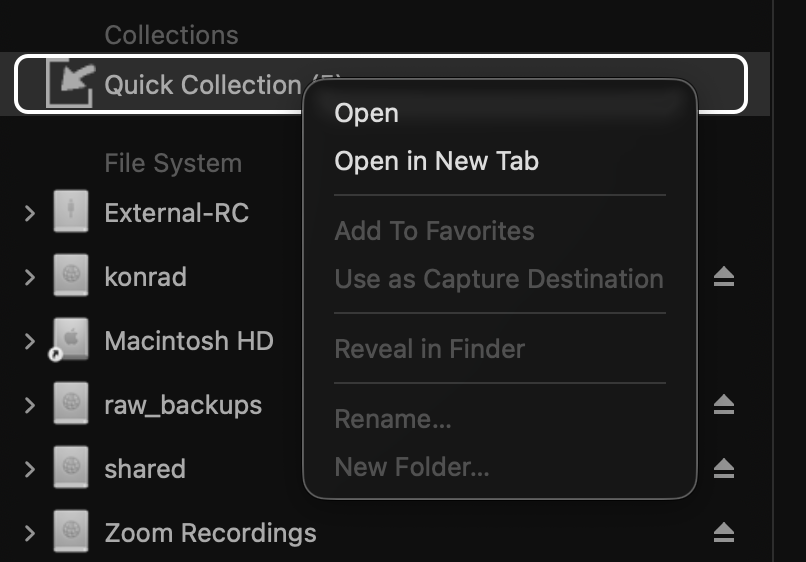
The disabled commands name the things Hasselblad never built:
- Add to Favorites: Quick Collection is not a folder you can favorite.
- Use as Capture Destination, Reveal in Finder: no path on disk to capture into or reveal.
- Rename: the name is hardcoded.
- New Folder: no parent container that could hold a sibling collection.
Even Open in New Tab flickers in and out depending on what is currently selected; sometimes it is enabled, sometimes not.
The structural read on this is that Phocus did not build a Quick Collection context menu. It bolted Quick Collection onto the standard folder model and disabled the operations that do not apply. Every grayed-out line is a feature that exists for real folders and was never extended.
How do you add images to Quick Collection?
Three ways, none of them obvious from the sidebar:
- Cmd+B (Mac) or Ctrl+B (PC) toggles the selected thumbnails in and out of the collection. This is the canonical method documented in the Phocus User Guide.¹
- Drag and drop a thumbnail (or a multi-selection) onto the Quick Collection entry in the sidebar.
- Right-click a thumbnail to expose "Add to Quick Collection" near the top of the context menu.
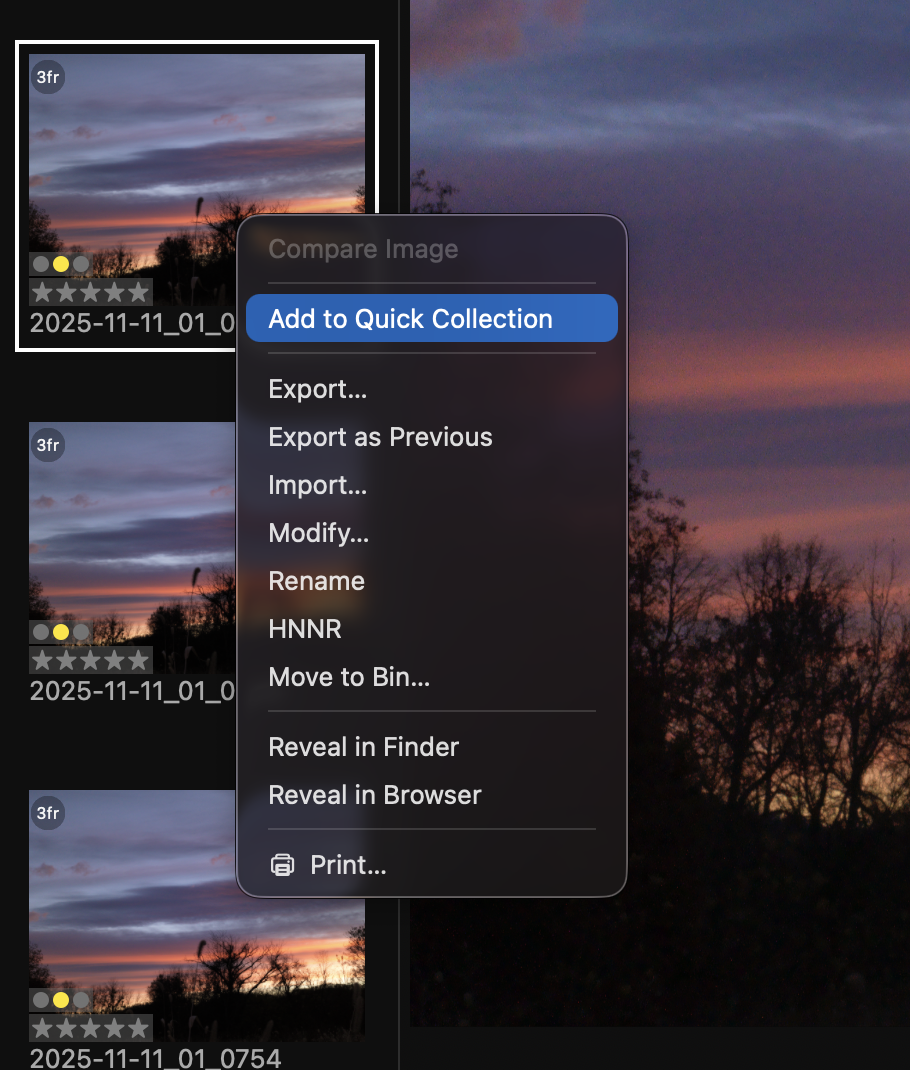
The right-click route is the only one a user can find without reading documentation. Phocus offers no toolbar button and no menu-bar entry under View or Window. The Edit menu does carry the same Add/Remove command, but you have to know to look there.
The same Cmd+B toggles a file out again if it is already in the collection. Selecting multiple thumbnails and pressing Cmd+B once will mix-add and mix-remove based on each file's current state, which is rarely what you want. Easier to filter the Thumbnail Browser first.
Have you seen the guide? I've published Essential Phocus 4.x for Mac - 85 topics across 8 sections and 251 pages covering everything from HNCS color science to HDR workflows. It's the reference manual Hasselblad hasn't updated since 3.8. It's $49, and updates are included.
Printed version of Essential Phocus 4.x for Mac is now available! Coil bound to open flat, and printed on premium color paper.
How do you remove items or clear the collection?
There is no Clear Quick Collection command. Phocus has shipped this feature without one. The two workable approaches:
- Click into the Quick Collection view, press Cmd+A to select all, then Backspace or Delete. This empties the collection without touching the originals.
- Select a known set of items in their source folder and press Cmd+B again. This toggles them out. Useful if you only need to remove a subset.
If you accidentally re-add files (a common mistake when Cmd+B's mix-add behavior catches you off guard), repeat the same selection plus Cmd+B to undo.
The collection survives a Phocus restart. The number in brackets next to the sidebar heading shows the current count, so "Quick Collection (47)" means 47 aliases live in there. Files in a Quick Collection get a small badge icon on the thumbnail.¹
Files are aliases, not copies. Delete the original from its source folder and the alias automatically disappears from Quick Collection. Delete the alias from Quick Collection and the original stays put.
Researching and writing the blog and page posts I produce takes up a lot of my time and costs me money for software subscriptions, tooling, and other incidentals related to running a business.
Please consider a paid membership to help me keep the lights on and pay the bills - it is only a fraction of the cost of an X2D II and a lens. Click on the button to go to the membership page to see the options available.
When could you actually use Quick Collection?
Three workflows where it might earn its place:
- Cross-folder selection. Pull the best frames from a multi-day shoot whose captures live in five different date folders. The native filesystem does not help here. Quick Collection does.
- Client review short-list. Build a curated set to walk through with a client without copying files anywhere or building a parallel folder structure.
- Pre-export staging. Gather what you want to export, confirm the count, then run Export on the collection contents.
For everything else, the alternatives in Phocus do the job:
- Star ratings (1 to 5) work well within a single folder.
- Favorites in the sidebar handle frequent-folder navigation.
The honest scope of Quick Collection is narrow: one ad-hoc set of files at a time, no metadata, no smart rules, no ability to save and restore named selections.
What organizational features did Hasselblad never build?
The feature stops at "one bucket plus a shortcut." Compared to Lightroom and Capture One, the editors I used before adding the X2D II to my camera collection, what is missing is substantial:
- Smart Albums (rules-based collections that auto-populate based on rating, date, or metadata). Don't exist.
- Named or multiple collections. You cannot create a "Wedding 2026" collection, a "Print queue" collection, and a "Stock submissions" collection. Just the one.
- Export collection as XMP or share file. No way to hand the selection to another user or another machine.
- Versioning or saved snapshots. When the collection changes, the previous state is gone.
The collection is also not visible to the .phos sidecar files. As I covered in What Phocus Writes to the .phos When You Switch HNCS Presets, the .phos stores per-image edit state. Collection membership lives somewhere else entirely, presumably in a Phocus-internal database that has no public interface.
My read is that Quick Collection was added in a much earlier Phocus release as the answer to "I just shot a card full of frames, give me a way to flag the keepers." It worked. Then nothing was added on top. Lightroom and Capture One both went deeper into virtual library models. Phocus stayed at one bucket plus Cmd+B.
So: how do you create a new collection in Phocus 4.x? You don't. You memorize Cmd+B and you have used the whole feature.
References
- Hasselblad, Phocus User Guide, p. 24, "Collections."
- Author's testing on Phocus 4.1.2, macOS 26 Tahoe, 2026-05-05.