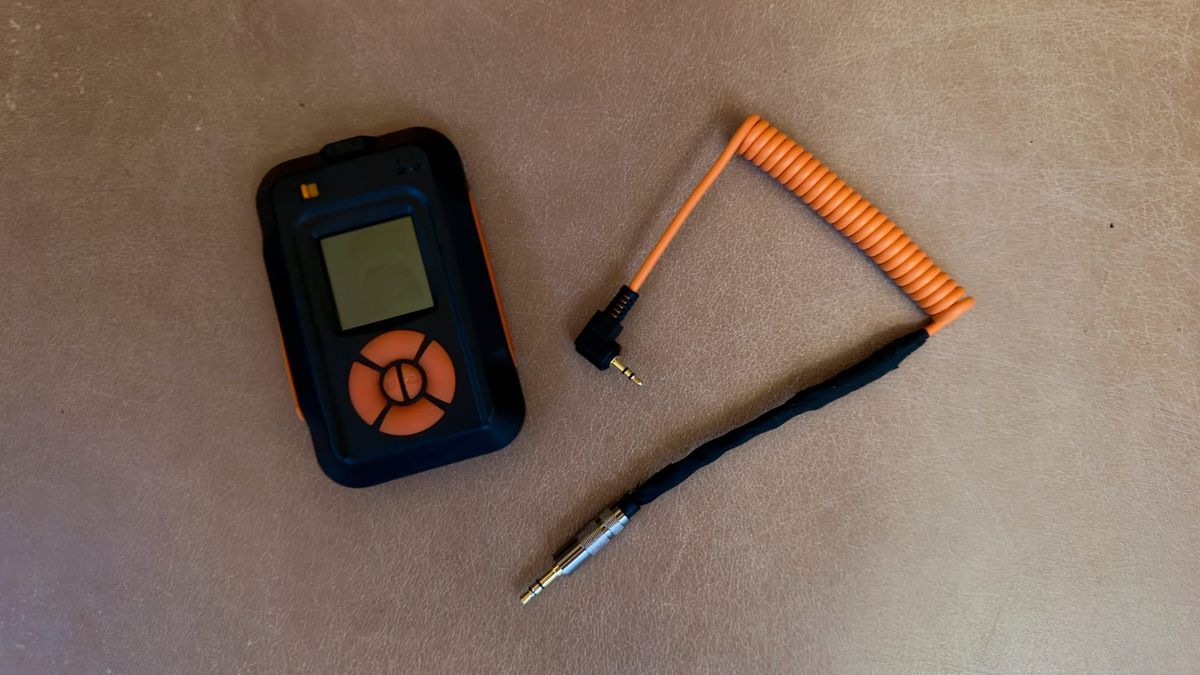
You do research on the internet, and then you buy a 2.5mm-to-3.5mm adapter, plug your MIOPS trigger into the X2D II's shutter control port, and fire the shutter from the MIOPS Smart's remote mode. Nothing fires. The adapter is wired straight through, nothing is visibly broken, and every forum thread you found swears this setup is supposed to work. It doesn't. The reason is a single-contact mismatch that no passive adapter can correct.
Nobody sells a MIOPS-to-Hasselblad cable. The X-series release pinout is undocumented by Hasselblad, and the handful of forum posts I found that touch the subject are either wrong or stop short of a working answer. So I put a multimeter on the Hasselblad Release Cord X, found the contact the camera actually listens to, and soldered a cable that fires the X2D II on demand. This is the pinout and the build.
Key finding: A passive 2.5mm-to-3.5mm adapter will not trigger a Hasselblad X2D II. MIOPS and most generic triggers put the shutter signal on the plug tip, but the X-series shutter release fires only when its ring is shorted to ground. The fix is a two-wire cable routing the MIOPS tip to the Hasselblad ring.
Why won't a passive 2.5mm adapter trigger the X2D II?
The shutter pulse arrives at a contact the camera ignores.
MIOPS, like most generic triggers, follows the Canon RS-60E3 convention and puts its shutter signal on the tip of the plug. The Hasselblad X-series release works the other way around: it fires when the ring is shorted to ground, and its tip does nothing at all from what I can tell. A pass-through adapter maps tip to tip and ring to ring, so MIOPS's shutter pulse lands on the Hasselblad tip, which does not appear to be connected to anything. The camera never sees a closure. You get silence.
What the Release Cord X actually does
The cord appears to short the ring to the sleeve, and nothing else.
Hasselblad's own release cord for the X series is the Hasselblad Release Cord X (part CP.HB.00000242.01). It is a 3.5mm TRS plug that goes into the X2D II's shutter control port. Put a multimeter across the contacts and press the button: the ring (middle) shorts to the sleeve (ground) at about 0.5 ohms. That is pretty much a dead short, a plain dry-contact switch with no resistor coding to decode. The tip sits unused.
There is no half-press. One press runs the camera's focus-then-fire sequence when autofocus is on, or fires instantly in manual focus. That single-stage behavior matters for the wiring, because it means the focus line on the trigger side has nothing to do.
Compatibility is worth a line, because it trips people up. The cord works on the X1D, X1D II 50C, the 907X bodies, and the X2D II. Hasselblad's own camera comparison lists a "shutter control port (supports Hasselblad X system release cord)" on the X2D II, and Hasselblad Support said the same in a December 2025 reply posted to B&H's Q&A: "You can use this with an X2DII. It has the required port for the cable present." The original 2022 X2D 100C is the exception. That same comparison table leaves its triggering row blank, because the first-generation body has no shutter control port at all, so there is nowhere to plug in.
One note on buying one. When I first wrote this in mid-2026, Hasselblad had quietly dropped the Release Cord X from its X-system accessories page, B&H showed it out of stock with no restock date, and used cords on eBay were the only reliable source, which is where I found mine. As of late August 2026 it is back: Hasselblad's North American store and B&H both list it new at $80. If all you want is the factory cord, buy it there. The DIY cable below is still worth the evening if you want a trigger that works with a MIOPS or any other dry-contact release, and the pinout is the same either way.
Have you seen the guide? I've published Essential Phocus 4.x for Mac - 85 topics across 8 sections and 250 pages covering everything from HNCS color science to HDR workflows. It's the reference manual Hasselblad hasn't updated since 3.8. It's $49, and updates are included.
The MIOPS side puts the shutter on the tip
MIOPS Smart, and Pluto, and most camera triggers built around the Canon sub-mini standard, use the same 2.5mm TRS layout: tip is shutter, ring is focus, sleeve is ground. The trigger fires by shorting tip to sleeve. That is the convention the whole category inherited from Canon's RS-60E3, and it is the reason a Hasselblad refuses to listen to it through a straight adapter.
How do you wire a MIOPS trigger to the X2D II?
Route the MIOPS shutter to the Hasselblad trigger, tie the grounds, and ignore the rest.
MIOPS Tip    (shutter) ──────► HB Ring   (trigger)
MIOPS Sleeve (ground)  ──────► HB Sleeve (ground)
MIOPS Ring   (focus)   ──── not connected
HB Tip                 ──── not connected
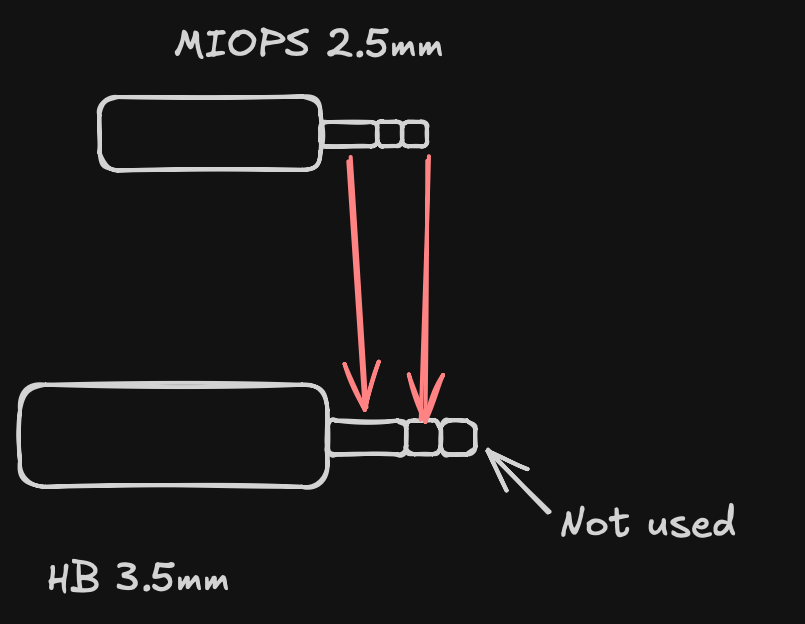
Two wires carry the entire circuit. The focus line is irrelevant because the X-series cord has no half-press concept, and a single closure already does focus-then-fire on the camera side. Connect anything to the Hasselblad tip and you are wiring to a dead contact.
If you would rather not solder anything, Hasselblad's own wireless answer is Phocus Mobile 2 on an iPhone, and Phocus itself can fire the camera over a wired tether from a computer. This build is for the triggers neither one can drive: lightning, sound, and motion sensors that need a hard contact closure with no app or computer in the loop. Phocus Mobile 2 carries its own caveat, too. In my testing it has not reliably reconnected once the camera goes to sleep: more than once I have had to kill the app, restart it, and reconnect from scratch to wake the camera, and a couple of times even that did not work.
The gotcha nobody documents: the MIOPS plug is short
The MIOPS-supplied 2.5mm plug is physically shorter than a standard 2.5mm stereo plug. That one detail turns a twenty-minute job into an evening.
It has two consequences. You cannot splice a standard 2.5mm-to-3.5mm adapter onto the MIOPS plug and call it done, because the connector geometry does not match. And the build that does work means cutting both cables, the MIOPS-supplied camera cable and the adapter cable, then soldering them together with the contacts remapped so the MIOPS tip ends up on the Hasselblad ring. My finished cable is not pretty. On the bench it fires the X2D II without missing, dozens of frames in a row with the MIOPS unit, which is all a lightning trigger asks of a cable. The bench is not a thunderstorm, though, and when the storm test finally happened it exposed a problem no cable can fix. That result gets its own section below.
This is the part the forum threads skip, and it is exactly the warning a reader needs before ordering parts.
Researching and writing the blog and page posts I produce takes up a lot of my time and costs me money for software subscriptions, tooling, and other incidentals related to running a business.
Please consider a paid membership to help me keep the lights on and pay the bills - it is only a fraction of the cost of an X2D II and a lens. Click on the button to go to the membership page to see the options available.
Camera settings for lightning and high-speed triggers
Set the X2D II to Manual Focus, and set the focus to infinity. The infinity part matters as much as the manual part. The most accurate way is in the camera: toggle through the live-view screens until the distance scale appears, then double-tap the infinity symbol on the right of the scale, which drives autofocus to infinity, and switch to manual focus to lock it there. If you are shooting manual glass with a hard infinity stop you can set it on the lens instead, though I find the in-camera method more reliable. A lightning strike lasts a few milliseconds, and you want the shutter to open the instant MIOPS closes the contact. In autofocus the camera tries to lock first, and that hunt adds latency you cannot afford when the subject is already gone.
For anything involving off-camera flash alongside the trigger, the flash and shutter behavior on the X2D II has its own constraints worth reading before you commit to a setup.
The storm test: the trigger fires, the frames are empty
The storm finally arrived, and the answer is no. The MIOPS detected every strike and closed the contact each time, the camera fired each time, and not one frame contained lightning.
The cable is not the suspect here, and neither is the trigger. On the bench the closure fires the camera every single time, and in the field it did too. What remains is shutter lag: the interval between the contact closing and the exposure actually starting. On the X2D II with the XCD 25V, that interval is long enough that the strike had ended before the shutter opened, every time, across an entire storm. Whether the other V-series lenses respond faster I have not tested, and it hardly matters. At lightning distances the 25V is the lens you would mount anyway.
So for lightning specifically, this rig is out, and the old method is back in: stack ND filters, run an intervalometer, and shoot back-to-back exposures of around six seconds so the shutter is already open when the strike happens. No reaction time involved, which is the only strategy that survives the camera's response lag. The X2D II's built-in interval timer covers that job on its own, so the MIOPS stays home for lightning work.
The cable itself is still worth building. Sound and motion triggers fire on events that last long enough for the camera to catch up, and any use where a hard contact closure beats an app in the loop still needs exactly this wiring. Only the millisecond-scale subjects are off the table.
Protecting the camera
A direct two-wire build is electrically safe, because the MIOPS output is already an isolated dry contact. The camera only ever sees a switch closing, which is exactly what its own cord does.
If you want a margin around an expensive body, drop a reed relay or an optoisolator between the trigger and the camera. That keeps the two grounds isolated and guarantees the camera sees nothing but a clean contact closure, no matter what the trigger's electronics do upstream. It is one extra component and a few more minutes with the iron.
Measure before you cut
Measure your own cord before you cut anything. The X-series pinout is undocumented, so everything here came from probing the cord directly rather than from a spec sheet, and a retailer listing can change while a multimeter cannot. What you end up with is a trigger cable Hasselblad never sold you.
A word on safety
Photographing a thunderstorm puts you next to the most dangerous weather most of us will ever point a camera at. Lightning kills people who were sure the storm was still far off, and a camera on a metal tripod in an open field is exactly the tall, isolated, conductive target that gets hit. Treat it with respect.
The safest way to shoot lightning is from inside a hard-topped vehicle or a building, firing through a window or from a doorway. This is the real argument for a remote trigger: it lets you put a wall between you and the camera, so the camera handles the exposed foreground while you stay sheltered. If you are out in the open, keep well back from the cell, get off ridgelines, and stay away from water, lone trees, and open ground. "Far away" is not the same as "safe." A workable rule of thumb: if thunder reaches you within about 30 seconds of the flash, the storm is already close enough to hit you, so get to shelter, and wait at least 30 minutes after the last thunder before going back out.
A photograph is not worth your life. Set the shot, get behind something solid, and let the cable do the waiting.
References
- Hasselblad Release Cord X, part CP.HB.00000242.01 (product page and Q&A). B&H Photo, including the December 2025 Hasselblad Support answer confirming X2D II compatibility.
- Hasselblad X2D II / X2D 100C / 907X side-by-side comparison. Hasselblad's spec table: a shutter control port on the X2D II and 907X, and none on the original X2D 100C.