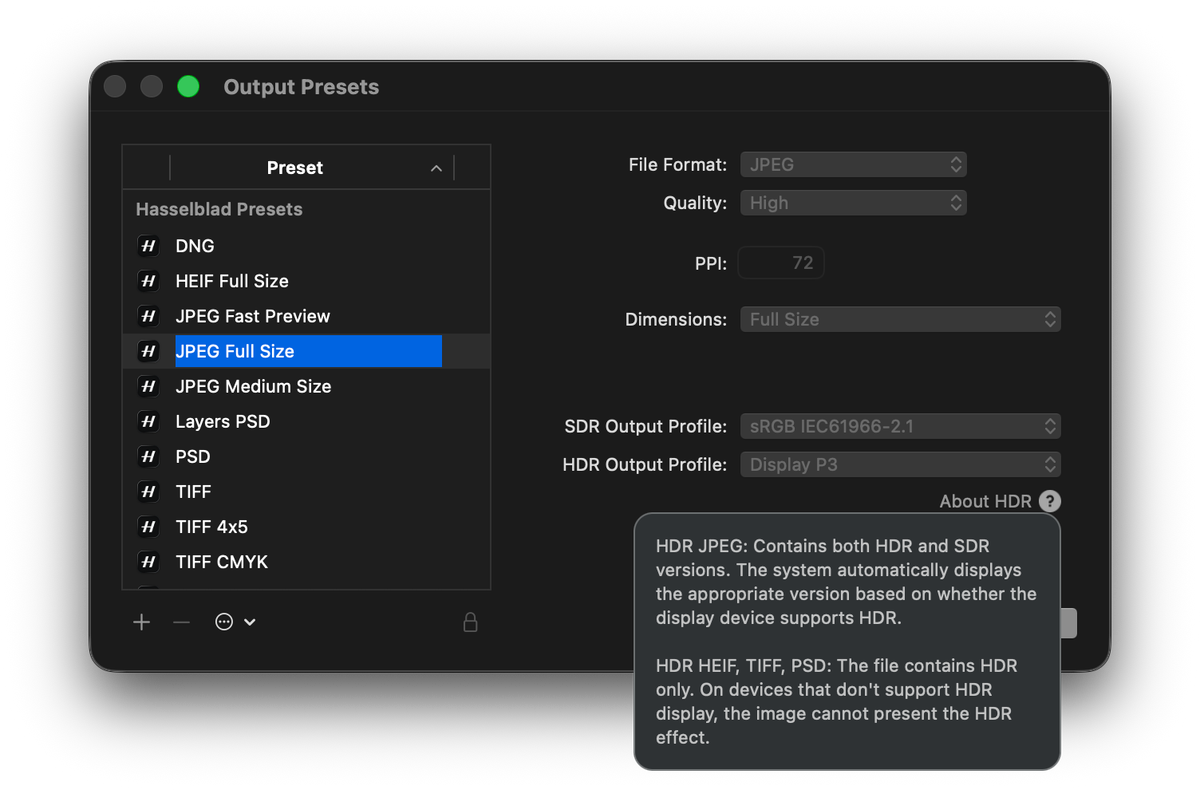
If you updated to Phocus 4.2, opened the export dialog, and went looking for the UltraHDR JPEG Full Size preset, you came up empty. Both dedicated Ultra HDR presets are gone. For anyone whose HDR delivery workflow was pointed at that named preset, this looks like a feature removal.
It isn't. The presets were removed; the capability was kept and automated. I exported a test frame from Phocus 4.2 and inspected the result with ExifTool, and the change is better than the export dialog lets on. The UI admits it exactly once, in a tooltip.
Key finding: Phocus 4.2 removed the two dedicated UltraHDR JPEG export presets, but Ultra HDR output is now automatic: exporting an HDR-mode image with any JPEG preset produces a gain-map Ultra HDR JPEG with a Display P3 base, confirmed by ExifTool inspection of a full-resolution X2D II export.
Why is the Ultra HDR JPEG preset missing in Phocus 4.2?
In Phocus 4.0 and 4.1.x, Ultra HDR JPEG was its own pair of factory presets (UltraHDR JPEG Full Size and Medium Size), separate from the regular JPEG presets. Phocus 4.2 rebuilt the export model around per-preset color profiles: every output preset now carries both an SDR Output Profile and an HDR Output Profile, and Phocus picks the right one based on whether the image being exported is in HDR mode.
The release notes put it this way:
"Hasselblad presets now automatically use appropriate SDR and HDR color profiles for each supported file format. Custom presets can also be configured with separate SDR and HDR profiles."
Under that model, a dedicated Ultra HDR preset has no job left to do. JPEG Full Size handles both cases. SDR image in, normal JPEG out. HDR-mode image in, Ultra HDR JPEG out.
I covered the redesigned Output Presets dialog in my Phocus 4.2 release rundown. At the time I wrote that anyone with a workflow built on the named preset would need to rebuild it around the new dialog. Turns out there is nothing to rebuild: the plain JPEG presets already do the job. You just export.
Researching and writing the blog and page posts I produce takes up a lot of my time and costs me money for software subscriptions, tooling, and other incidentals related to running a business.
Please consider a paid membership to help me keep the lights on and pay the bills - it is only a fraction of the cost of an X2D II and a lens. Click on the button to go to the membership page to see the options available.
What does a plain JPEG export of an HDR image actually produce?
A full Ultra HDR JPEG, automatically. I exported a single HDR-mode X2D II frame from Phocus 4.2 using the plain JPEG Full Size preset, no Ultra HDR anything selected, and ran the result through ExifTool:
$ exiftool -ee -G1 2025-11-11_01_0729.jpg
[MPF0]           Number Of Images        : 2
[MPImage2]       MP Image Type           : Gain Map Image
[ICC_Profile]    Profile Description     : Display P3
[XMP-hdrgm]      Version                 : 1.0
[XMP-hdrgm]      Gain Map Min            : -4, -4, -4
[XMP-hdrgm]      Gain Map Max            : 4.001, 4, 3.999
[XMP-GContainer] Directory Item Semantic : Primary, GainMap
[File]           Image Width             : 11656
[File]           Image Height            : 8742
Four things are sitting in that output:
- The gain map is there. The file contains two images: the primary SDR rendition and an embedded gain map (2.2 MB of the 17.7 MB file). This is the ISO 21496-1 gain-map structure, the same format Google documents as Ultra HDR, with
hdrgmmetadata version 1.0. - The base is Display P3. This matches what the old dedicated UltraHDR presets produced. The redesigned Output Presets dialog shows the pair openly: JPEG Full Size carries sRGB IEC61966-2.1 as its SDR Output Profile and Display P3 as its HDR Output Profile (that dialog is this post's feature image), and the HDR path applies the Display P3 base. The SDR rendition did not quietly narrow to sRGB.
- Full resolution. 11656 x 8742, the X2D II's native output size, which also re-confirms that the 4.1.2 export dimension cap is fixed.
- Around four stops of headroom. The gain map's per-channel range runs from -4 to +4 in log2 values, so on an HDR-capable display the file can push highlights up to roughly four stops above the SDR base.
One RAW frame in, one dual-layer JPEG out. The gain map is computed from the difference between the SDR and HDR renders that Phocus derives from your adjustments on that single exposure, which is how Hasselblad's HDR pipeline has worked all along. HNCS HDR works from a single exposure end to end; my HNCS HDR explainer covers why no bracketing is involved anywhere in this system.
The flip side: the HDR checkbox now decides everything. Export the same image with HDR mode off and you get an ordinary SDR JPEG, no gain map. Phocus exposes no export-time control for any of this; the image's render state is the switch.
Have you seen the guide? I've published Essential Phocus 4.x for Mac - 85 topics across 8 sections and 250 pages covering everything from HNCS color science to HDR workflows. It's the reference manual Hasselblad hasn't updated since 3.8. It's $49, and updates are included.
Does this apply to HEIF and TIFF too?
I have not run the same metadata inspection on a 4.2 HEIF export yet, so this section leans on the release notes and Hasselblad's own UI text rather than my own ExifTool evidence. They say the automatic SDR/HDR profile selection applies to every supported file format, so HEIF presets should behave the same way. What comes out is a different animal, though. HDR HEIF uses PQ encoding (the Rec. 2100 transfer function baked into the pixel data), not a gain map. It carries no SDR base layer to fall back on, which is why its ecosystem is narrower: current Apple platforms display the extended highlights correctly, while Android and Windows apps generally do not.
Hasselblad's own UI backs this up. Hover over the small About HDR label in the Output Presets dialog and the tooltip spells out the split. HDR JPEG: "Contains both HDR and SDR versions. The system automatically displays the appropriate version based on whether the display device supports HDR." HDR HEIF, TIFF, PSD: "The file contains HDR only. On devices that don't support HDR display, the image cannot present the HDR effect." That is the dual-layer gain-map model versus single-layer HDR-only output in the vendor's own words, and it extends the HDR-only caveat to TIFF and PSD.
Conflate the two formats and you will draw wrong conclusions about who can actually see your files. For the full comparison, including where HDR TIFF fits and why none of these are the right handoff to Capture One, see the output formats trilemma post.
The catch: the explanation is a tooltip
Here is my complaint with how this shipped. The change itself is good engineering. The old model made you choose between a JPEG preset and an Ultra HDR preset, and choosing wrong silently threw away your HDR render. The new model makes the correct output a side effect of the image state. Fewer decisions, fewer silent failures.
But discoverability went backwards. Hasselblad did write the explanation down; finding it is the problem. It sits behind a mouseover on the small About HDR label in the Output Presets editor, and I only stumbled on it while taking the screenshot that became this post's feature image. The preset list itself carries no labelled Ultra HDR entry anymore. A photographer who relied on UltraHDR JPEG Full Size sees their preset vanish after an update and has every reason to conclude Hasselblad dropped the feature. The truth is the opposite. The feature got better (4.2 also improved highlight rendering for exported HDR files, per the release notes), and the per-export memory leak that plagued Ultra HDR batches in 4.1.x is fixed. A tooltip in a preset editor is not where anyone hunting for a vanished preset will look. Why that sentence couldn't also be a line in the export dialog, Hasselblad alone will know.
What this means for your workflow
Three practical takeaways:
- Delete the mental step, keep the HDR checkbox step. Any JPEG preset, built-in or custom, produces Ultra HDR output when the image is in HDR mode. Confirm the HDR checkbox state before export; it is now the only thing that determines whether the gain map exists.
- Verify once if you care.
exiftool -ee -G1 yourfile.jpgand look forGain Map Image. Thirty seconds, and you never have to wonder whether your delivery files carry the HDR layer. - Batch exports are safe again. With the 4.1.x memory leak fixed, there is no longer a reason to restart Phocus between Ultra HDR export runs on 4.2.
The preset is gone. The format never left.
Related: Phocus 4.2.1 followed in July, with a changelog of eleven words.