My First 24 Hours with Phocus 4.1: One Fix, One Regression, One Crash
Phocus 4.1 fixes Ultra HDR JPEGs but breaks TIFF export paths. Workaround found: use the built-in TIFF-16 preset unchanged.

Phocus 4.1 for Mac dropped on December 19, 2025 according to the date on the release note. I discovered it nine days later quite serendipitously from a post on Hasselblad Digital Forum. There was no press release, no social media announcement that I noticed, just a quietly updated download link and a new readme PDF.
The timing was interesting. I was mid-draft on a correction post, ready to publicly eat crow about my earlier HDR claims. After weeks of additional testing, I'd discovered that Phocus 4.0.1's HDR TIFFs actually displayed beautifully on Apple devices: genuine HDR rendering with controlled highlights and expanded dynamic range. The "overexposed" appearance I'd complained about in Capture One and Lightroom wasn't a Phocus bug; it was those apps not understanding HDR encoding. I was prepared to set the record straight.
Then I updated to 4.1, re-ran my tests, exporting images with exactly the same workflow that I'd used with 4.0.1, and watched those same HDR TIFFs turn into blown-out messes on the same Apple devices that had rendered them perfectly 24 hours earlier.
🤯
What followed was an intensive testing session that uncovered one genuine improvement, one significant regression, and a Force Quit of Phocus. Here's what I found.
A note on support: This post represents my personal exploration and testing, not official technical support or guidance from Hasselblad. If you need assistance with your Hasselblad equipment, please contact Hasselblad directly: customersupport@hasselblad.com for global support, support.us@hasselblad.com for the Americas, or visit hasselblad.com/support for regional options.
Update: December 30, 2025 — A Workaround Exists
Within hours of publishing this post, a reader on hasselbladdigitalforum.com reported that HDR TIFF export works correctly when using the built-in "TIFF-16" preset without modification. I've confirmed this is accurate.
When you use the canned TIFF-16 preset as-is, Phocus 4.1 exports HDR TIFFs with a brand-new Hasselblad BT.2100 PQ profile (dated October 2025) and all required CICP tags. The files render correctly as HDR on Apple devices.
The bug I documented below is real, but more nuanced than I initially reported: the failures occur when you either (1) use "Source" as your output profile, or (2) explicitly select BT.2100 PQ in a custom preset. The built-in preset has HDR-aware logic that the user-configurable paths lack.
The workaround: Use the built-in "TIFF-16" preset exactly as shipped. Don't click Edit, don't modify it—just select it and export. Despite the UI showing "Adobe RGB (1998)" as the output profile, Phocus detects HDR content and substitutes the correct profile automatically.
The sections below reflect my original testing and remain accurate for those specific scenarios. I've left them intact rather than rewriting, because the underlying bugs are still present—there's just a path around them that I missed.
The Good: Ultra HDR JPEGs Finally Have Punch
Let's start with the genuine win.
In Part 3 of my HDR Demystified series, I documented how Phocus 4.0.1's Ultra HDR JPEG exports looked washed out: the highlights lacked punch, and the overall image felt flat compared to other HDR implementations. That problem appears to be resolved in 4.1.
The release notes state:
"Added automatic DRC application for HDR HEIF and HDR JPG images captured with the X2D II 100C, providing better image quality when HDR effects are turned off."¹
DRC (Dynamic Range Compression) affects how the camera's wide dynamic range gets mapped to output formats. The phrase "providing better image quality when HDR effects are turned off" is intriguing. It suggests the fix specifically addresses how HDR-captured images render when viewed on standard displays or when HDR viewing is disabled.
In my testing, this appears to address the washed-out appearance (compared to the HDR TIFF of the same RAW) I documented earlier. Ultra HDR JPEGs exported from 4.1 have noticeably better highlight control and overall punch, whether viewed in HDR mode or on a standard display. The improvement is immediately visible in side-by-side comparisons.
This matters because Ultra HDR JPEGs are Phocus's only cross-platform HDR format: they work on Apple devices, Android phones, and Windows (with supported applications). If your HDR workflow prioritizes compatibility over maximum fidelity, 4.1 makes that path significantly more attractive.
Have you seen the guide? I've published Essential Phocus 4.x for Mac - 72 topics across 156 pages covering everything from HNCS color science to HDR workflows. It's the reference manual Hasselblad hasn't updated since 3.8. Pay-what-you-want starting at $24.
Update: December 30, 2025 — A Workaround Exists
Within hours of publishing this post, a reader on hasselbladdigitalforum.com reported that HDR TIFF export works correctly when using the built-in "TIFF-16" preset without modification. I've confirmed this is accurate.
When you use the canned TIFF-16 preset as-is, Phocus 4.1 exports HDR TIFFs with a brand-new Hasselblad BT.2100 PQ profile (dated October 2025) and all required CICP tags. The files render correctly as HDR on Apple devices.
The bug I documented below is real, but more nuanced than I initially reported: the failures occur when you either (1) use "Source" as your output profile, or (2) explicitly select BT.2100 PQ in a custom preset. The built-in preset has HDR-aware logic that the user-configurable paths lack.
The workaround: Use the built-in "TIFF-16" preset exactly as shipped. Don't click Edit, don't modify it—just select it and export. Despite the UI showing "Adobe RGB (1998)" as the output profile, Phocus detects HDR content and substitutes the correct profile automatically.
The sections below reflect my original testing and remain accurate for those specific scenarios. I've left them intact rather than rewriting, because the underlying bugs are still present—there's just a path around them that I missed.
So the original is not entirely accurate:
The Bad: HDR TIFF Export Is Completely Broken
Now the bad news, and it's significant enough that it derailed an entire blog post.
In Phocus 4.0.1, HDR TIFF exports worked correctly on Apple devices. When I opened an HDR TIFF in Apple Photos, Preview, or Finder Quick Look, I saw genuine HDR rendering: controlled highlights, luminous midtones, the unmistakable "HDR pop" that comes from extended dynamic range. The same files looked overexposed in Capture One and Lightroom, but that was expected. Those apps don't understand the HDR encoding.
In Phocus 4.1, HDR TIFFs are broken in two distinct ways. And unlike the Ultra HDR JPEG issue which had a workaround (use a different format), there is no workaround for this. HDR TIFF export from Phocus 4.1 is simply non-functional.
Problem 1: Undocumented ICC Profile Change
Using identical export settings - TIFF-16 with Output Profile set to "Source" - 4.1 now embeds a completely different ICC profile than 4.0.1 did.
Attribute | Phocus 4.0.1 | Phocus 4.1 |
Profile Description | Rec. ITU-R BT.2100 PQ | Hasselblad RGB |
Profile Creator | Apple | Hasselblad |
Profile Version | 4.0.0 | 2.0.0 |
Profile Date | 2022 | 2005 |
The 4.0.1 profile was Apple's modern HDR profile designed for BT.2100 PQ content. The 4.1 profile is Hasselblad's legacy RGB profile from 2005, a profile that predates HDR by over a decade.
More critically, the CICP tags that signal "this is HDR content" to the operating system are completely absent in 4.1 exports using "Source". In 4.0.1, these tags told macOS to engage Extended Dynamic Range rendering. Without them, the system has no way to know the file contains HDR data.²
The result: files that display as severely overexposed on the same Apple devices that rendered them correctly when exported from 4.0.1. The pixel values are still PQ-encoded (where "normal white" sits at roughly 50% signal), but nothing tells the system to interpret them as HDR. Standard gamma is applied to PQ values, and everything above mid-gray clips to white.
Problem 2: Explicit BT.2100 PQ Selection Causes Silent Export Failure
The natural response to Problem 1 is: "Fine, I'll just explicitly select the BT.2100 PQ profile instead of relying on 'Source'." Phocus offers this option in the Output Profile dropdown.
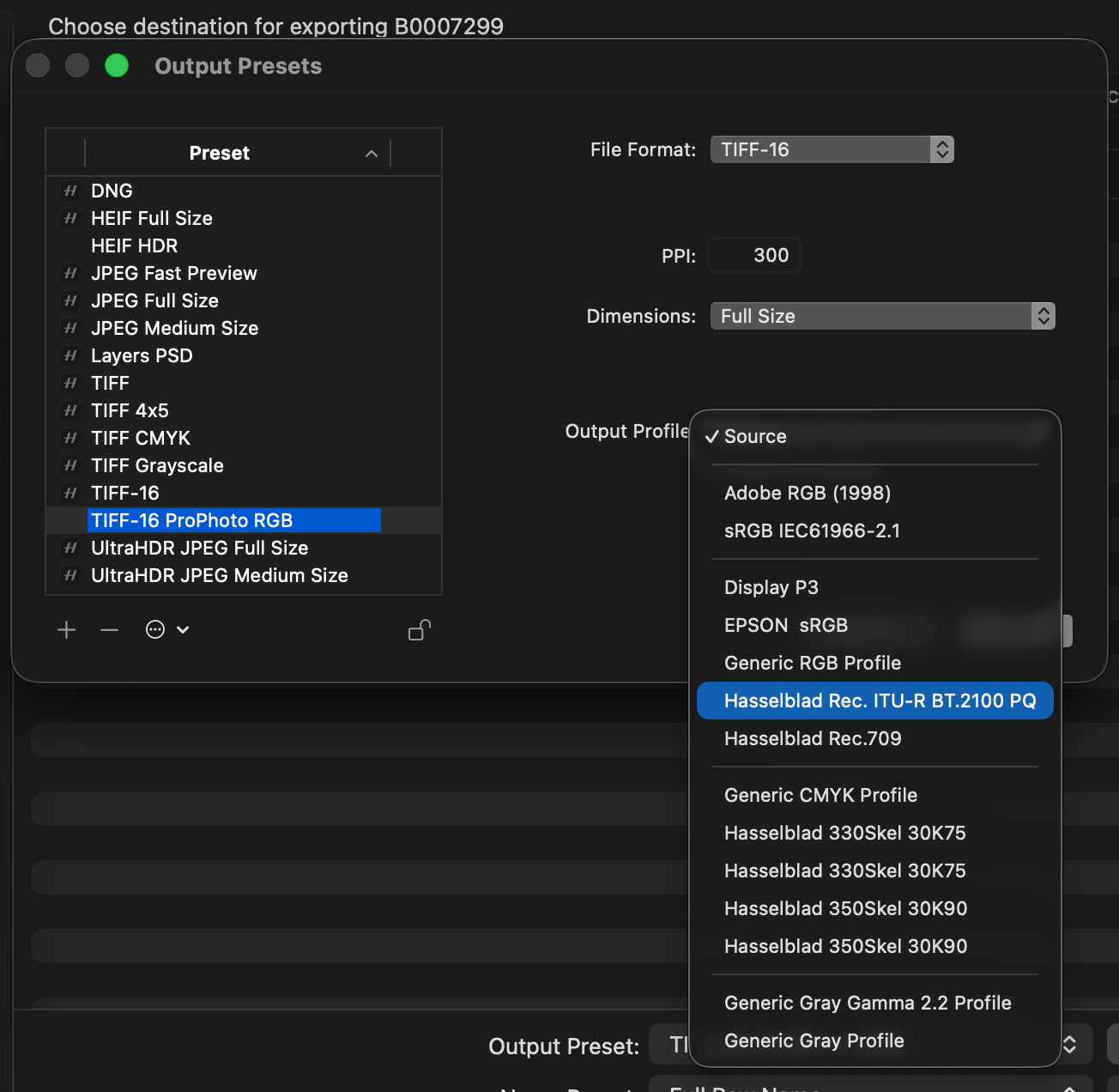
It doesn't work. 🤯
When you explicitly select "Hasselblad Rec. ITU-R BT.2100 PQ" as the output profile and attempt to export a TIFF, the file begins writing to your destination folder - you can see it appear in Finder - and then silently disappears. No error message. No warning. The file write never completes.
The same failure occurs with HEIF format. Non-HDR profiles (Adobe RGB 1998, Hasselblad Rec.709) export successfully, confirming the export system itself is functional. The failure is specific to the BT.2100 PQ color space.
The Ugly: A Force Quit

During this testing session, to my surprise, the application suddenly became completely unresponsive. To date I've only seen this when memory usage balloons and macOS decides to pause the app. This was a lightweight session with no scrolling through thumbnails, a few edits on a single image, and export testing.
The spinning beachball appeared and didn't go away. The UI froze. Mouse clicks did nothing. Keyboard shortcuts were ignored. After waiting over 100 seconds - long enough for macOS to generate a hang report - I had no choice but to Force Quit.
The macOS hang report confirmed the application had been unresponsive for the entire duration. According to the diagnostic data, the main thread was blocked waiting for a GPU operation that never completed.³
I need to be clear about what I can and can't say here:
What I observed:
- Phocus became completely unresponsive during a lightweight editing session. No thumbnail scrolling, only one HDR edit and exporting a few variants
- The hang lasted over 100 seconds before I Force Quit
- This was a ~12 minute session with moderate memory usage (3.3 GB, peak 5.1 GB)
What I can't confirm:
- Whether this is reproducible in 4.1 - I need to run another test with a larger set of images (it happened once; I haven't yet had time to test again)
- What specifically caused it (I was testing various export configurations prior to the hang. It would be really strange if this was the root cause.)
- Whether it's related to the HDR export issues or is a separate problem entirely
I'm not going to speculate on causation. The hang occurred, it required Force Quit, and any unsaved work would have been lost. I'm about to file a bug report with Hasselblad including the macOS hang log and Activity Monitor sample.⁴
What This Means for Your Workflow
Given these findings, here's how I'd approach Phocus 4.1:
If you rely on HDR TIFF exports: Don't update yet. Stay on 4.0.1 if you have it, or hold off until Hasselblad addresses the regression. There is no workaround: HDR TIFF export appears to be non-functional in 4.1.
If you only need Ultra HDR JPEGs: Update to 4.1. The quality improvement is real and noticeable. This is actually the better version for cross-platform HDR delivery via JPEG.
If you need lossless HDR archival: You're currently stuck. Your options are:
- Stay on 4.0.1 for working HDR TIFFs (but with the washed-out JPEG issue)
- Use 4.1 and export standard (non-HDR) TIFFs, preserving HNCS color science for future re-export when the bug is fixed
- Accept JPEG compression and use Ultra HDR JPEG from 4.1
If you already updated: Your original 3FR files are untouched. Any HDR TIFFs you exported from 4.1 can be re-exported once Hasselblad fixes this—you haven't lost anything permanently, just the ability to produce working HDR TIFFs right now.
What Happens Next
I've documented these issues and am filing detailed bug reports with Hasselblad support. I'll update with a new post when I hear back or when a fix is released. If you'd like to see the actual bug report I sent in and send one in yourself, please contact me directly.
The broader pattern here is worth noting: Hasselblad's HDR implementation is clearly under active development. That's good - it means they're investing in the feature. But it also means the ground can shift between versions. Workflows that work today might not work tomorrow.
For Phocus users, the practical lesson is familiar: test before updating, maintain the ability to roll back if possible, and don't assume stability in features that are still evolving. And if you encounter issues, report them - the more data points Hasselblad receives, the faster these problems get addressed.
References
¹ Hasselblad, "Phocus 4.1 Mac readme," December 19, 2025. Available from Hasselblad Phocus download page.
² CICP (Coding-Independent Code Points) tags enable HDR identification per ICC.1:2022 specification. 4.0.1 exports included cicpPrimaries=9 (BT.2020), cicpTransferCharacteristics=16 (PQ), cicpMatrixCoefficients=0 (Identity), cicpVideoFullRangeFlag=1 (Full). These tags are absent in 4.1 exports.
³ macOS hang report (2025-12-29 13:47:39) shows main thread blocked in __psynch_cvwait waiting for Metal GPU command buffer completion via HBCoreImage framework.
⁴ Bug reports PHOCUS-007 (HDR Export Non-Functional) and PHOCUS-008 (Application Hang) will be filed with supporting diagnostic data.

The Tech Behind the Frame Newsletter
Join the newsletter to receive the latest updates in your inbox.