Hasselblad HDR Demystified, Part 4 of 5: Displays, In-Camera Limitations, and Platform Support
Not all HDR displays are equal. Learn which iPhones, Macs, and monitors show Hasselblad HNCS HDR, plus in-camera limits and platform gaps.

Table of Contents
This is the fourth part of a five-part series exploring Hasselblad's HDR implementation for RAW shooters.Part 1 covered what HNCS HDR is, Part 2 explored output formats and the Trilemma, and Part 3 walked through the complete Phocus 4.x workflow. If you're joining at the end, you might want to start at the beginning - but this post also stands alone as a practical reference.
By now you hopefully have a slightly better understanding of what HNCS HDR is, what your output format options are, the trade-offs involved, and how to actually process and export HDR images from Phocus 4.x. But a critical question remains: where can people actually see your HDR work? And what limitations exist both in-camera and across platforms?
This installment covers display requirements across Mac, iOS, Android, and Windows; the X2D II's in-camera HDR limitations; and the current platform gaps you need to be aware of. Part 5 will bring it all together with print considerations, archival strategies, and practical recommendations.
A note on support: This post represents my personal exploration and does not constitute official technical support or guidance from Hasselblad. If you need assistance with your Hasselblad camera, Phocus, or any other Hasselblad product, please contact Hasselblad directly: customersupport@hasselblad.com for global support, support.us@hasselblad.com for the Americas, or visit hasselblad.com/support for your regional contact options.
Display Requirements: Where You Can Actually See HDR

HDR's visual impact depends entirely on the display showing it. View an Ultra HDR JPEG on an SDR monitor, and you'll see the embedded SDR fallback - a perfectly fine image, but without the extended luminance that makes HDR compelling. View that same file on a capable HDR display, and highlights genuinely glow brighter than the surrounding interface elements. The difference isn't subtle.
What makes a display "HDR-capable" comes down primarily to peak brightness. Standard SDR displays typically max out around 200-400 nits. True HDR requires sustained peak brightness of 1000 nits or more - Apple brands this "XDR" (Extreme Dynamic Range) on their professional displays. Some displays advertise HDR support at lower brightness levels (500-600 nits), and while they can show some HDR benefit, the full impact requires that 1000+ nit capability.
The following list covers devices and software confirmed to properly display Ultra HDR JPEG content. This isn't exhaustive - HDR display support is expanding rapidly - but it covers the platforms most relevant to Hasselblad users.
Mac
Apple offers multiple paths to HDR display, ranging from full XDR displays with 1600 nits peak brightness to standard displays that support HDR through Apple's EDR (Extended Dynamic Range) technology. Understanding the distinction helps set appropriate expectations for what you'll see during editing and what your audience will experience.
Full XDR Displays
Apple's XDR displays deliver the complete HDR experience with peak brightness exceeding 1600 nits - bright enough to render the full range of HDR content without compression. The Pro Display XDR ($4,999, stand sold separately) is Apple's professional standalone monitor; despite being six years old at this point and likely overdue for a refresh, it remains one of the best HDR editing environments available. Liquid Retina XDR displays are built into MacBook Pro models from 2021 onward. These are the displays Hasselblad seem to have had in mind when developing their HDR workflow.Pro Display XDR (6K, 1600 nits peak)
- MacBook Pro with Liquid Retina XDR display (2021 and later)
- Requires macOS 15.0 or later¹
- Preview app supports Ultra HDR JPEG viewing
EDR: HDR on Non-XDR Apple Displays
Here's something that surprised me during testing: Apple Studio Display does show HDR content, despite not being marketed as an HDR display. The technology enabling this is EDR (Extended Dynamic Range), which Apple has quietly built into macOS since Catalina.²
EDR works by fundamentally changing what "white" means to the display. In traditional SDR, the brightest value in your image maps to whatever the display's current brightness happens to be. EDR remaps "SDR white" to less than the display's full brightness, reserving headroom above that point for HDR highlights. When an HDR image contains pixels meant to exceed SDR peak white, the display can render them brighter than surrounding content - up to its physical limits.
The practical difference between XDR and EDR comes down to how much headroom exists:
Display | Peak Brightness | HDR Capability |
Pro Display XDR | 1600 nits | Full XDR - renders complete HDR luminance range |
MacBook Pro (Liquid Retina XDR) | 1600 nits | Full XDR - renders complete HDR luminance range |
Studio Display | 600 nits | EDR - shows HDR highlights, limited to 600 nits |
iMac 24" (M1/M3/M4) | 500 nits | EDR - shows HDR highlights, limited to 500 nits |
On a Studio Display viewing your Ultra HDR JPEG, specular highlights will genuinely appear brighter than the surrounding interface elements - the display is doing exactly what the gain map instructs. But those highlights max out at 600 nits rather than 1600. It's real HDR, just with a lower ceiling.
This matters for workflow decisions. If you're editing HDR content on a Studio Display, you can see the HDR effect and evaluate whether your highlights pop. What you can't do is judge how dramatic that effect will appear on a true XDR display - the luminance relationship you're seeing is compressed compared to what viewers with higher-brightness displays will experience.
iPhone and iPad
Apple's mobile devices have been HDR-capable since the iPhone X introduced OLED displays, but full Ultra HDR JPEG support requires iOS 18 and sufficient RAM. The practical reality: if you're sharing images with clients or on social media, many viewers will experience your HDR work on an iPhone before anywhere else.
- iPhone 13 Pro and newer (with at least 6GB RAM)
- iPad Pro 13-inch (M4), iPad Pro 12.9-inch (5th gen+), iPad Pro 11-inch (M4)
- Requires iOS 18 or later with Low Power Mode disabled¹
- Note: HDR display quality reduced in Low Power Mode, at elevated temperatures, or excessive screen brightness
Android
Google developed the Ultra HDR format, so Pixel devices have the most mature support. Other Android manufacturers have adopted the standard with varying levels of implementation quality. Samsung's "Super HDR" branding indicates Ultra HDR JPEG compatibility on their flagship devices.
- Google Pixel 6 and newer with full Ultra HDR capture and display support
- Samsung Galaxy S24 series (branded "Super HDR"), OnePlus 12, Xiaomi 14 Ultra
- Note: Adobe Lightroom Mobile for Android officially supports HDR only on select Pixel devices
The Camera Itself
The X2D II's rear display is a genuine HDR screen - not just marketing. At 1400 nits peak brightness, it can show you in the field what your HDR output will actually look like on capable displays. This is a significant upgrade from the X2D 100C's 800-nit screen.
- X2D II's 1400-nit OLED touchscreen (75% brighter than X2D 100C)³
- EVF also supports HDR preview
Third-Party Software Support
Beyond Phocus itself, several applications can display (and in some cases edit) Ultra HDR JPEG files. Browser support is particularly useful for web-based portfolio display. Safari 26+ (fall 2025) now offers the most comprehensive HDR photo support of any browser, handling not just JPG gain maps but also HEIF, JXL, and PNG HDR formats that other browsers don't yet support.⁴ Chrome, Edge, and other Chromium-based browsers have supported HDR photos since 2023.
- Adobe Lightroom Classic 13.0+, mobile app 9.0+¹
- Adobe Camera Raw 15.1+¹
- Safari 26+ (macOS/iOS 26+), Chrome, Edge, Brave, Opera browsers support Ultra HDR JPEG⁵
A notable implication for iOS users: since all browsers on iPhone and iPad use WebKit (Apple's browser engine) under the hood, Safari 26's HDR support means Chrome, Firefox, and every other browser on iOS/iPadOS now displays HDR photos on web pages correctly. This closes what had been a frustrating gap - prior to fall 2025, HDR-capable iPhones could display HDR photos perfectly well in native apps like Photos, Instagram, or Lightroom Mobile, but could not render HDR photos viewed on websites in any browser. You'd see only the SDR fallback, even on a device with a 1600-nit XDR display.
Windows
While Phocus for Windows doesn't yet support HDR editing or export, Windows users can still view Ultra HDR JPEG files on HDR-capable displays. Windows 11 has native HDR support, though the experience is less seamless than macOS - you may need to manually enable HDR in display settings, and color calibration can be finicky.
- Chrome, Edge, and other Chromium browsers display Ultra HDR JPEGs on HDR monitors
- Windows Photos app supports HDR display on compatible hardware
- HDR monitor required (DisplayHDR 1000 certification or better recommended for full impact)
- Note: Many "HDR" monitors below 1000 nits will show limited benefit
A Practical Note on Screen Size and HDR Perception
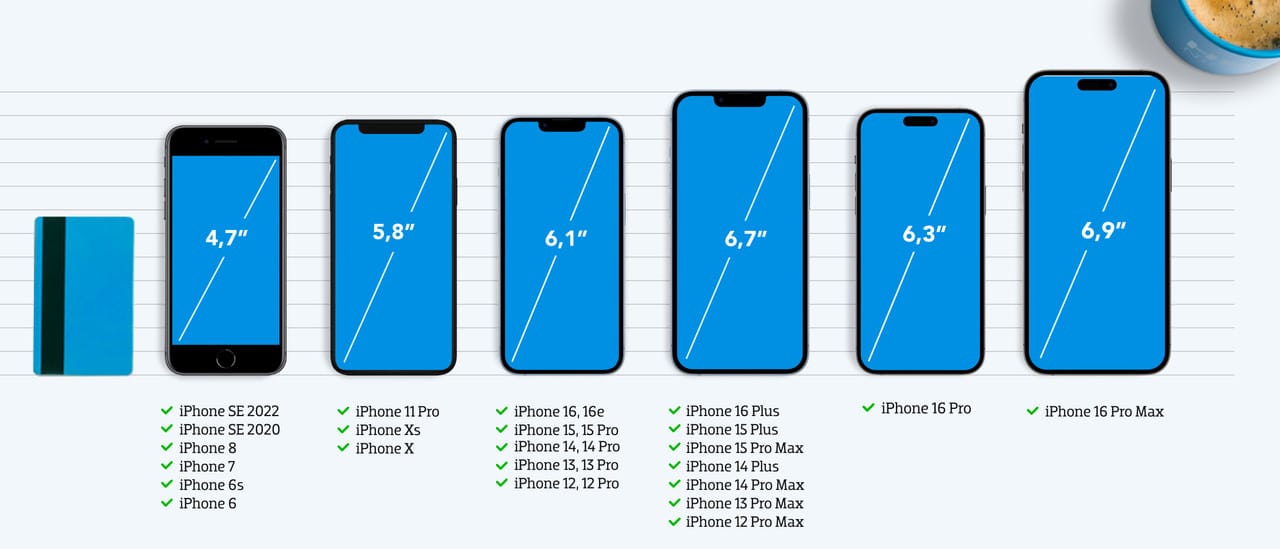
There's an aspect of HDR viewing that technical specifications don't capture: the visual impact of HDR diminishes significantly on smaller screens.
In my testing, HDR images that showed striking differences on a 27-inch Studio Display or especially my MBP's 14-inch display - where highlights genuinely glowed brighter than the surrounding interface, even at the display's 600-nit EDR ceiling - appeared nearly identical to their SDR versions when viewed on an iPhone 17 Pro Max. The HDR data was there; the display was rendering it correctly; but the perceptual difference was subtle to the point of irrelevance.
This isn't a flaw in the technology. It's physics. The same highlight detail that commands attention when spread across 14 or 27 inches of screen real estate occupies far fewer photons on a 6.9-inch display held at arm's length. Add variable ambient light conditions (phones are used everywhere, not just in controlled viewing environments), and the contrast between HDR highlights and their surroundings compresses further.
The practical implication: if your audience primarily views images on phones - which describes most social media consumption - they may not perceive the HDR difference you carefully crafted on your studio display. This doesn't mean HDR export is pointless for social sharing; the files are backward-compatible and future-proof. But it does suggest tempering expectations about how dramatically your HDR work will land on small screens.
In-Camera HDR Output: Understanding What the Toggle Controls
The X2D II's HDR menu setting causes considerable confusion because it controls something specific: whether the camera generates HDR-processed JPEGs or HEIFs with embedded gain maps at capture time. It does not affect what the sensor captures (that's always the full 15.3 stops of dynamic range), and it doesn't prevent you from creating HDR output later via Phocus.
Understanding this distinction is crucial. When the HDR toggle is grayed out or unavailable, it means the camera cannot produce in-camera HDR JPEGs/HEIFs in that shooting mode - but your RAW files remain fully capable of HDR processing in post. The limitation is about when HDR rendering happens, not whether it's possible.
When the HDR Toggle Is Unavailable
In several shooting scenarios, the HDR option in the camera menu will be grayed out. This means the camera cannot apply HDR processing to generate gain-map-embedded JPEGs or HEIFs in these modes. The RAW data captured is unaffected - you can always process it with HDR in Phocus later.⁶
- Manual exposure mode - HDR processing requires the camera to control exposure; in Manual, you've taken over that control⁷
- Continuous, Exposure Bracketing, or Focus Bracketing drive modes - likely due to processing overhead; the camera can't apply HDR rendering fast enough for burst shooting⁷
- When using a Nikon-compatible flash - flash exposure apparently conflicts with HDR processing requirements⁷
- RAW-only image format - there's no JPEG or HEIF being generated to apply HDR processing to⁷
Metering Restriction When HDR Is Enabled
When HDR output is enabled, the camera locks you into Smart Metering — you cannot switch to spot, center-weighted, or any other metering mode. The rationale appears to be that HDR processing requires the camera to evaluate the full scene's dynamic range to determine how to render the gain map, which Smart Metering is designed to do. Whether this is a genuine technical requirement or an overly cautious design choice isn't clear from Hasselblad's documentation.
- HDR forces Smart Metering mode - cannot be changed⁷
Why RAW-Only Disables the Toggle
This is the key distinction between in-camera HDR and Phocus HDR processing. The in-camera HDR toggle controls whether the camera applies HDR rendering when generating a JPEG or HEIF - embedding a gain map that tells HDR displays how much to boost each pixel. If you're shooting RAW-only, there's no rendered output file to apply this processing to. RAW files are just sensor data; no rendering has happened yet.
The important point: your RAW files still capture the full 15.3 stops of dynamic range regardless of whether the HDR toggle is available or enabled. The sensor doesn't know or care about your output format settings. What changes is when HDR rendering occurs - at capture time (in-camera JPEG/HEIF) or later in Phocus (from RAW).
What about the on-camera preview? This is where it gets interesting. When shooting RAW-only, the camera still generates an embedded JPEG preview for displaying on the LCD and EVF. Based on observed behavior and the documented requirement that HDR must be enabled at capture time, this embedded preview appears to be SDR-rendered when the HDR toggle is unavailable.⁸ Your RAW data still contains the full sensor dynamic range, but the preview you see on the camera's 1400-nit screen won't show HDR luminance unless you've enabled JPG or HEIF output with HDR turned on. This is purely a preview limitation - it doesn't affect what Phocus can do with the RAW file later.
- In-camera HDR output requires JPG or HEIF format selected⁷
- RAW files captured in any mode can be processed with full HDR in Phocus⁶
Current Platform Limitations

Beyond the in-camera restrictions, there's one significant platform limitation worth understanding: Windows support for Phocus's HDR workflow remains incomplete.
Windows Users
This is the most significant platform gap right now. If your primary editing workstation runs Windows, you're currently locked out of Phocus's HDR workflow entirely. You can still edit your RAW files in Phocus for Windows with all the SDR tools, but HDR preview and export simply aren't available.
- Phocus for Windows does not currently support HDR (confirmed as of v3.8.7, September 2025)⁹
- Ultra HDR JPEGs are interpreted as standard JPG files (you see the SDR base image)⁹
- HDR support is confirmed for a future feature release⁹
Social Media: Instagram and Threads
Social media represents a significant potential audience for HDR photography. Meta announced HDR photo support for Instagram and Threads in March 2024, making these platforms among the first major social networks to support the format.¹⁰
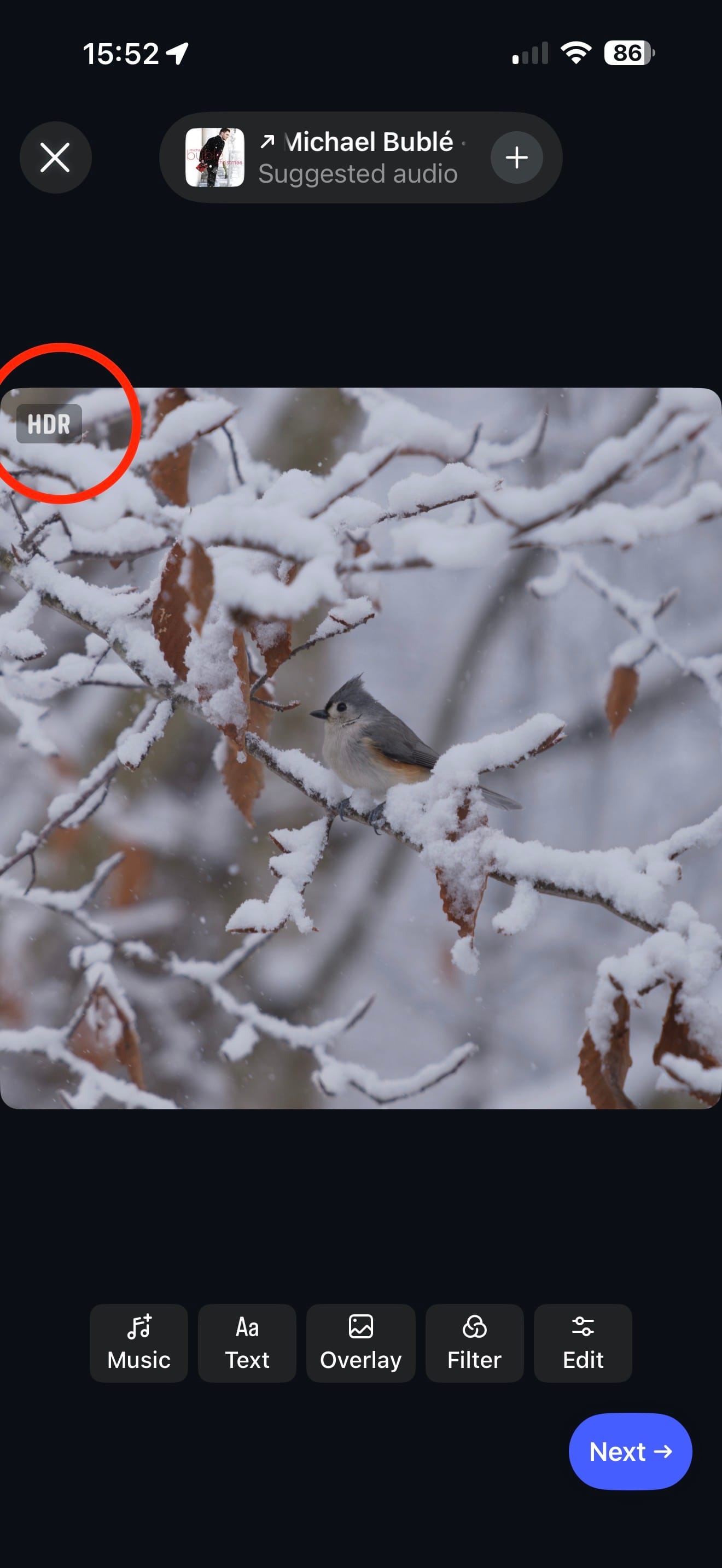
In my testing (December 2025), Phocus Ultra HDR JPEGs uploaded directly from an iPhone to Instagram were recognized as HDR content. During the upload process, a transient "HDR" badge appeared in the upper-left corner of the image preview, indicating Instagram detected the gain map metadata. The final posted image, viewed in the Instagram iOS app on an iPhone 17 Pro Max, displayed with whites that genuinely appeared bright and clean rather than compressed to gray - consistent with HDR rendering.
This finding is notable because earlier guidance from HDR photography experts recommended against uploading HDR images from iPhones. Greg Benz, whose extensive HDR testing has been invaluable to the photography community, wrote in March 2024:
"Do NOT upload HDR from an iPhone, the quality is substantially lower at this time."¹¹
Our different results likely reflect substantial platform evolution since that testing - we're now on iOS 26, and Instagram has had over a year of updates to its HDR handling. This isn't a contradiction of earlier findings; it's evidence that the landscape continues to improve.
Viewing the same post via Safari on macOS 26 (on an M4 Pro MacBook Pro with full HDR display capability) did not show HDR rendering - the image appeared as standard SDR. This isn't a browser limitation; as noted earlier in this article, Safari 26 now has excellent HDR photo support. Rather, it appears Instagram's web interface simply doesn't serve HDR content to browsers, regardless of their capabilities. This likely reflects different development priorities between Instagram's mobile app and web teams.
Threads
Threads support appears significantly less mature than Instagram, despite both being Meta properties. In our testing:
- Direct upload to Threads: No HDR badge appeared during upload. The posted image showed noticeably grayer whites and worse resolution than the Instagram version - clearly SDR.
- Automatic repost from Instagram to Threads: The cross-posted image was also not HDR, and appeared even more degraded than the direct Threads upload.
This partially aligns with earlier documented behavior noting that Threads HDR support is less reliable than Instagram's.¹² However, earlier testing suggested automatic reposts from Instagram to Threads preserved HDR - our December 2025 testing found the opposite, with automatic reposts appearing worse than direct uploads.
Practical Implications
If you're sharing Phocus HDR exports to social media, Instagram's iOS app appears to be the most reliable path for HDR delivery to viewers on HDR-capable devices. The web experience remains SDR, and Threads doesn't appear to support HDR at all currently. Given how rapidly this space is evolving, these observations may well be outdated within months (of Dec 12th 2025).
Scheduling Tools and Website Builders: HDR Metadata Loss
If you use social media scheduling tools or plan to display HDR photos on your website, be aware that many platforms strip HDR metadata during processing.
Florian Thess documents this limitation in his HDR guide:
"Scheduling platforms like Sprout etc. will strip all HDR metadata. The same will happen when uploading HDR images to Instagram or Threads via your PC as opposed to your mobile device. Wix and SquareSpace also re-process the images, resulting in loss of HDR metadata."¹³
This creates a workflow constraint for photographers who rely on scheduling tools for consistent posting. Your options are limited: either accept SDR-only delivery through scheduled posts, or maintain a separate manual upload workflow for HDR content. Given that Instagram's mobile app appears to be the most reliable path for HDR delivery anyway (based on our December 2025 testing), the scheduling limitation may simply reinforce what's already the best practice.
For portfolio websites, the situation is similarly constrained. If you're using Wix, SquareSpace, or similar website builders, your uploaded HDR images will likely display as SDR regardless of your viewers' display capabilities. Photographers who want HDR delivery on their own sites may need to consider platforms that preserve original file encoding - or accept that web portfolio viewing will remain SDR for the foreseeable future.
Conclusion
HDR display technology has matured significantly in the past few years. Apple's ecosystem - from XDR displays to EDR-enabled standard monitors to iOS devices - offers the most cohesive HDR viewing experience for photographers. Android support continues to improve, particularly on flagship devices. Windows remains the weak link, both for editing (Phocus HDR features unavailable) and for consistent viewing.
The in-camera limitations are worth understanding but shouldn't drive shooting decisions for RAW photographers. Whether your HDR toggle is available or grayed out, your sensor captures the same 15.3 stops of dynamic range. The only question is whether you get an HDR-rendered JPEG or HEIF alongside your RAW - and for most serious work, the Phocus workflow offers more control anyway.
Part 5 covers the remaining practical questions: what happens when you try to print HDR, how to think about archiving HDR files for the long term, and concrete recommendations for when HDR export makes sense versus when SDR remains the better choice.
I'd love your feedback on this post, or any of my other posts. I'd also love to hear any ideas for topics I haven't yet covered that you'd like me to look into.
Or even other content about the topics I've written about which I haven't referenced. I am always open to learning more.
Series Navigation
This post is part of a five-part series on Hasselblad's HDR implementation:
- Part 1: What Is HNCS HDR and Why Should RAW Shooters Care?
- Part 2: Output Formats and the Trilemma Every Shooter Faces
- Part 3: The Complete Phocus 4.x Workflow
- Part 4: Displays, In-Camera Limitations, and Platform Support (you are here)
- Part 5: Print, Archival, and Practical Recommendations
References
- Hasselblad X2D II 100C FAQ, Display Requirements section.
- Werner Robitza, "Extended Dynamic Range (EDR) and Reference Mode on macOS," slhck.info, February 2023. EDR was introduced in macOS Catalina (10.15) and "changed what white means for millions of Macs." https://slhck.info/posts/extended-dynamic-range-edr-and-reference-mode-on-macos/
- Hasselblad Press Release. "...new 3,6-inch OLED touchscreen at up to 1 400-nit peak brightness - 75 percent brighter than the X2D 100C."
- Greg Benz Photography, "Apple Safari now supports HDR photography!" June 2025. Safari 26 adds comprehensive HDR photo support including JPG gain maps (ISO and legacy encodings), HEIF, JXL, and PNG. "At 17% of global web traffic, Safari support closes most of the existing gap in HDR browser support." https://gregbenzphotography.com/photography-reviews/apple-safari-now-supports-hdr-photography/
- Greg Benz Photography, "Gain maps make HDR look great on any screen," September 2025. https://gregbenzphotography.com/hdr-photos/jpg-hdr-gain-maps-in-adobe-camera-raw/
- Hasselblad X2D II 100C Product Page, Footnote 4. "In these drive modes, RAW files can still be processed with HDR effects in Phocus and exported as Ultra HDR JPG images."
- X2D II 100C User Manual v1.0, Section 2.7 "HDR Function."
- This conclusion is based on the X2D II User Manual stating that HDR must be enabled at capture time (requiring JPG or HEIF format selected), and the FAQ stating "When HDR is disabled, photos will be captured and displayed with SDR effects." Since RAW-only shooting prevents HDR from being enabled, the embedded preview appears to follow SDR processing. Hasselblad does not explicitly document the embedded preview's HDR/SDR status.
- Phocus 3.8.7 for Windows ReadMe, September 26, 2025. "HDR (high dynamic range) is not supported... HDR will be supported in a future feature release of Phocus for Windows." Also: "UltraHDR files are interpreted as standard jpg files."
- Meta Engineering Blog, "Bringing HDR photo support to Instagram and Threads," March 26, 2024. https://engineering.fb.com/2024/03/26/android/instagram-threads-hdr-photos/
- Greg Benz Photography, "Instagram now supports HDR photos!" March 2024 (updated through late 2024). https://gregbenzphotography.com/hdr-photos/instagram-now-supports-hdr-photos/
- Greg Benz noted in 2024 that "Instagram's automatic repost to Threads also worked, but posting directly there did not." Our December 2025 testing found neither method preserved HDR on Threads, suggesting either a regression or different behavior with Phocus-generated files.
- Florian Thess, "High Dynamic Range Stills Photography: A Modern Guide." "Keep in mind that scheduling platforms like Sprout etc. will strip all HDR metadata... Wix and SquareSpace also re-process the images, resulting in loss of HDR metadata." https://www.florianthess.com/hdr-photography-guide

The Tech Behind the Frame Newsletter
Join the newsletter to receive the latest updates in your inbox.